Using sessions and traces
What you'll build: three tour-planning prompts called one after another as part of a single trip-planning "session," so you can see them grouped in the frontend, drill down into one call's trace, leave feedback on it, and jump back to the exact prompt that produced it.
Every gateway call is already recorded as a trace — a record of one request, its spans (a span is one unit of work, like the LLM call itself), tokens, and cost. A session is a lightweight way to say "these several traces belong to the same user flow." You tag each call with the same session id, and the frontend rolls them up into one view — handy when one user action (like planning a trip) triggers several prompt calls in a row.
A standalone script exercising this whole flow lives at scripts/guides/using-sessions-and-traces on GitHub.
1. Register the prompts
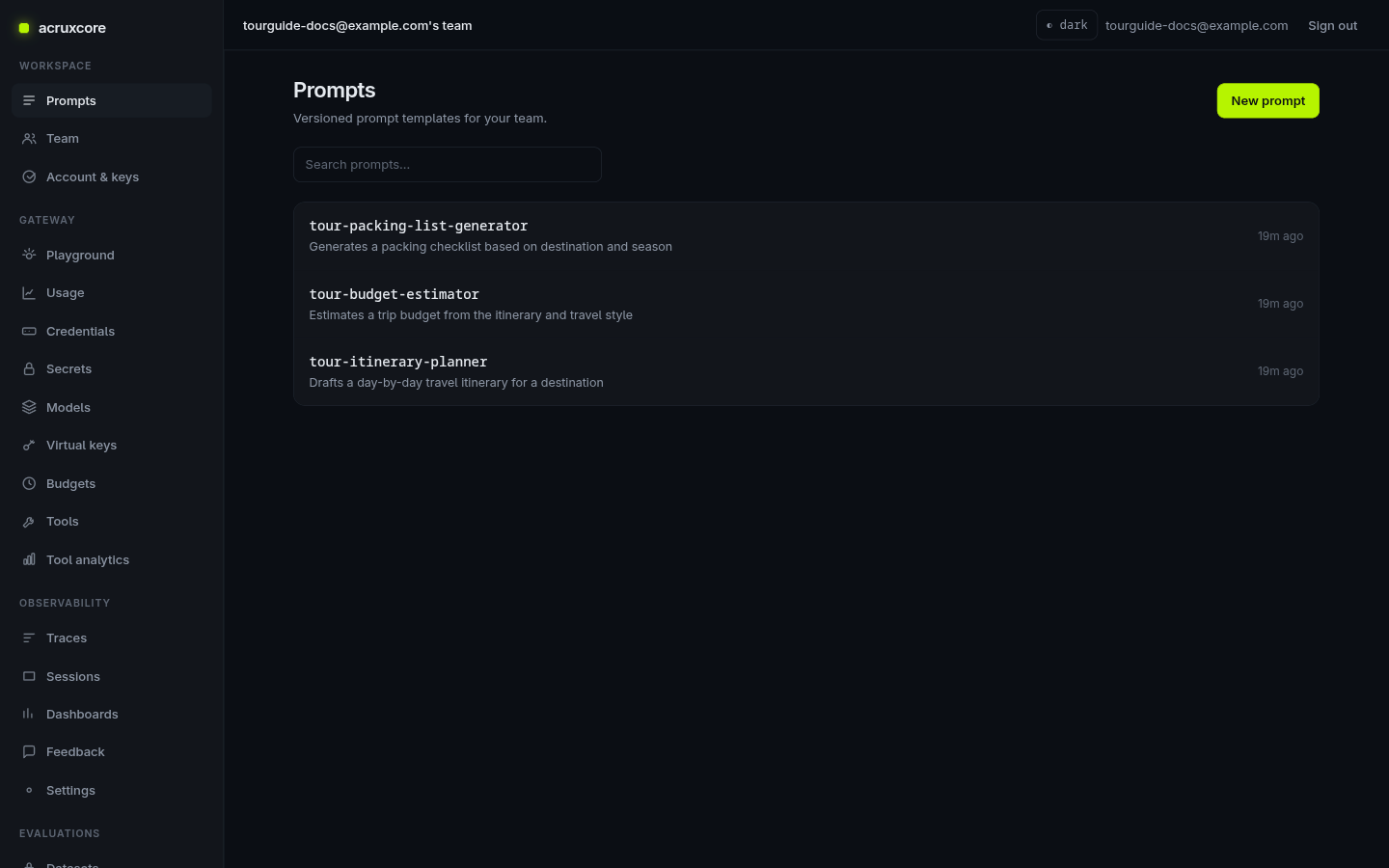
This guide uses a tour-planner theme: three separate prompts that together plan
a trip. Prompts → New prompt, create tour-itinerary-planner,
tour-budget-estimator, and tour-packing-list-generator, each with its own
system message and variables (e.g. {{ destination }}, {{ days }}). See
Version a prompt if you haven't created one before.
2. Call all three under one session
Send each prompt through the gateway with the same session id — an
x-session-id header on a raw gateway request, or sessionId in the SDK's
trace: option. Each call still gets its own trace, but they all share the
session id — that's the only thing that ties them together as one flow.
- curl
- Node (SDK)
- Python (SDK)
curl -X POST "$ACRUXCORE_BASE_URL/gateway/chat/completions" \
  -H "Authorization: Bearer $ACRUXCORE_API_KEY" \
  -H "Content-Type: application/json" \
  -H "x-session-id: tokyo-trip-plan-01" \
  -d '{"prompt":{"name":"tour-itinerary-planner","alias":"production","variables":{"days":"3","destination":"Tokyo"}}}'
The SDK doesn't call a stored prompt by name in one shot — render it first with
hub.prompts.render(), then pass the templated messages to hub.gateway.chat() (no tools) or
hub.gateway.runToolLoop() (if the prompt defines tools). Both accept trace: { sessionId }
to stamp the trace with the session id.
No tools — hub.gateway.chat():
import AcruxCore from '@acruxcoreai/sdk';

const hub = new AcruxCore();
const sessionId = 'tokyo-trip-plan-01';

const prompts: [string, Record<string, string>][] = [
  ['tour-itinerary-planner', { days: '3', destination: 'Tokyo' }],
  ['tour-budget-estimator', { days: '3', destination: 'Tokyo' }],
  ['tour-packing-list-generator', { days: '3', destination: 'Tokyo' }],
];

for (const [name, variables] of prompts) {
  const { messages, model, versionId } = await hub.prompts.render(name, 'production', variables);
  await hub.gateway.chat({
    model: model ?? 'gpt-4o-mini',
    messages,
    promptVersionId: versionId ?? undefined,
    trace: { sessionId },
  });
}
With tools — hub.gateway.runToolLoop():
for (const [name, variables] of prompts) {
  const rendered = await hub.prompts.render(name, 'production', variables);
  // The model, the messages, the bound tools and the version id all come from the
  // render — `clientTools` adds only the tools your own process has to run.
  await hub.gateway.runPromptWithTools(rendered, {
    trace: { sessionId },
    clientTools: { get_current_time: getCurrentTime },
  });
}
No tools — hub.gateway.chat():
import asyncio
from acruxcore import AcruxCore


async def main():
    hub = AcruxCore()
    session_id = "tokyo-trip-plan-01"

    prompts = [
        ("tour-itinerary-planner", {"days": "3", "destination": "Tokyo"}),
        ("tour-budget-estimator", {"days": "3", "destination": "Tokyo"}),
        ("tour-packing-list-generator", {"days": "3", "destination": "Tokyo"}),
    ]
    for name, variables in prompts:
        rendered = await hub.prompts.render(name, "production", variables)
        await hub.gateway.chat(
            rendered.model or "gpt-4o-mini",
            rendered.messages,
            prompt_version_id=rendered.version_id,
            trace={"session_id": session_id},
        )


asyncio.run(main())
With tools — hub.gateway.run_tool_loop():
async def main():
    hub = AcruxCore()
    session_id = "tokyo-trip-plan-01"

    for name, variables in prompts:
        rendered = await hub.prompts.render(name, "production", variables)
        # The model, the messages, the bound tools and the version id all come from
        # the render -- `client_tools` adds only the tools this process has to run.
        await hub.gateway.run_prompt_with_tools(
            rendered,
            client_tools={"get_current_time": get_current_time},
            trace={"session_id": session_id},
        )


asyncio.run(main())
Repeat for the other two prompts with the same session id (the SDK examples above already loop through all three). Open Observability → Sessions and the session shows up with all three calls rolled into it — trace count, total tokens, and the time span they happened in.
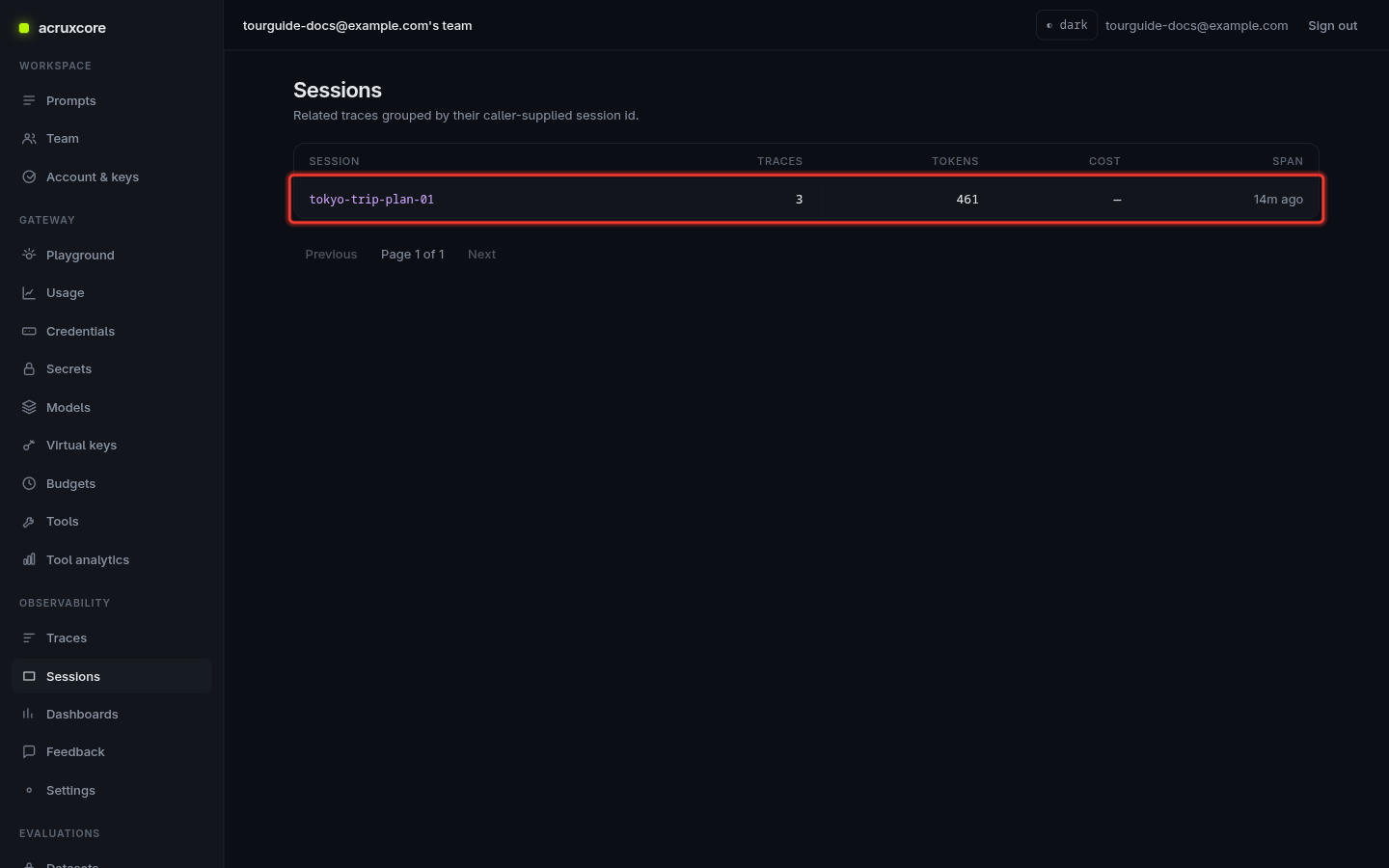
A session is never created directly — it's just a sessionId string shared by
one or more traces, and it doesn't start on its own. The first call that uses a
new session id "creates" it; every later call you want in that conversation must
carry the same id — an x-session-id header on a gateway request, or
sessionId in the SDK's trace: option. A call with no session id lands as a
standalone trace.
3. Open the session and drill into a trace
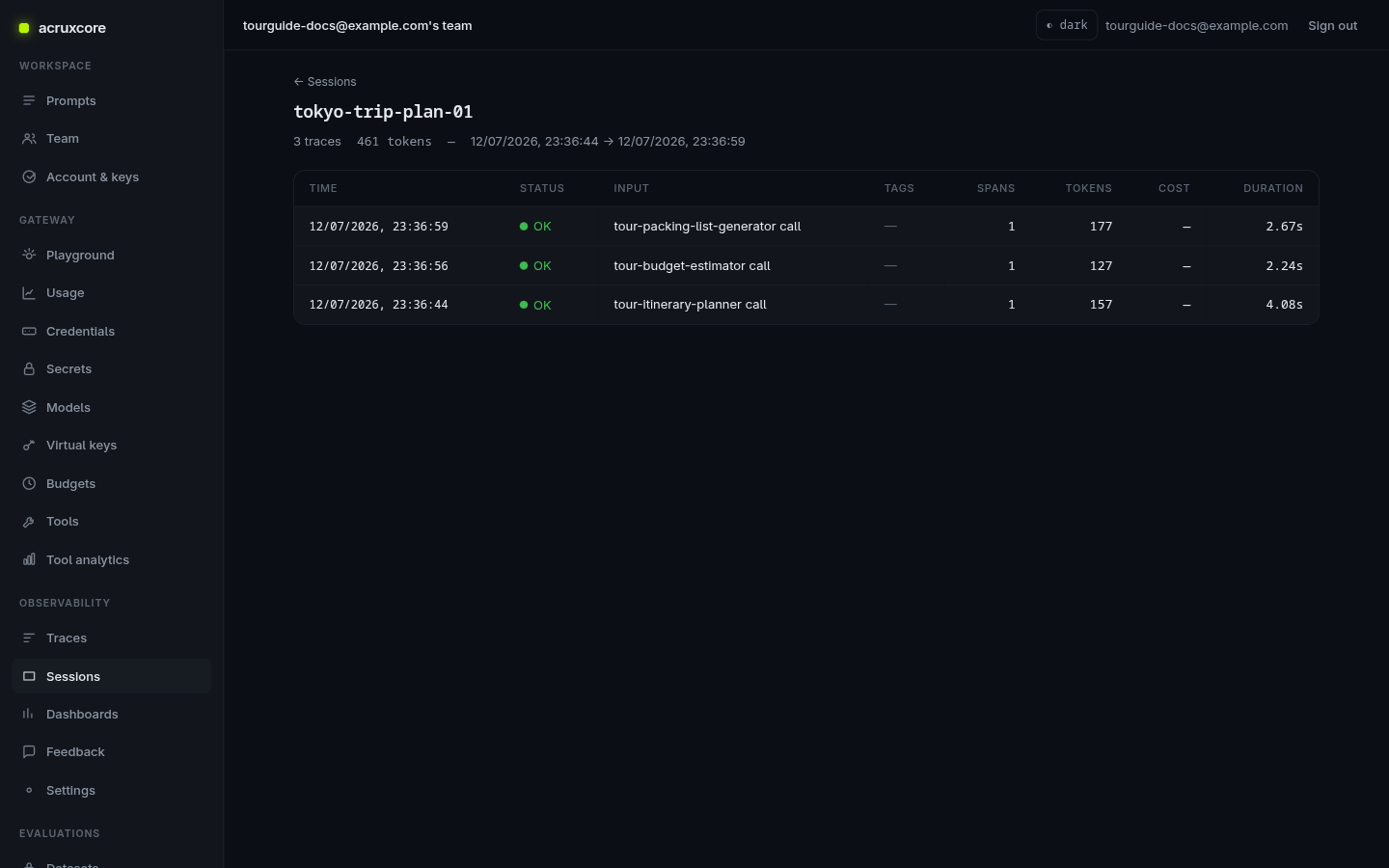
Click the session row to see every trace that shares its id — one per prompt call, newest first.
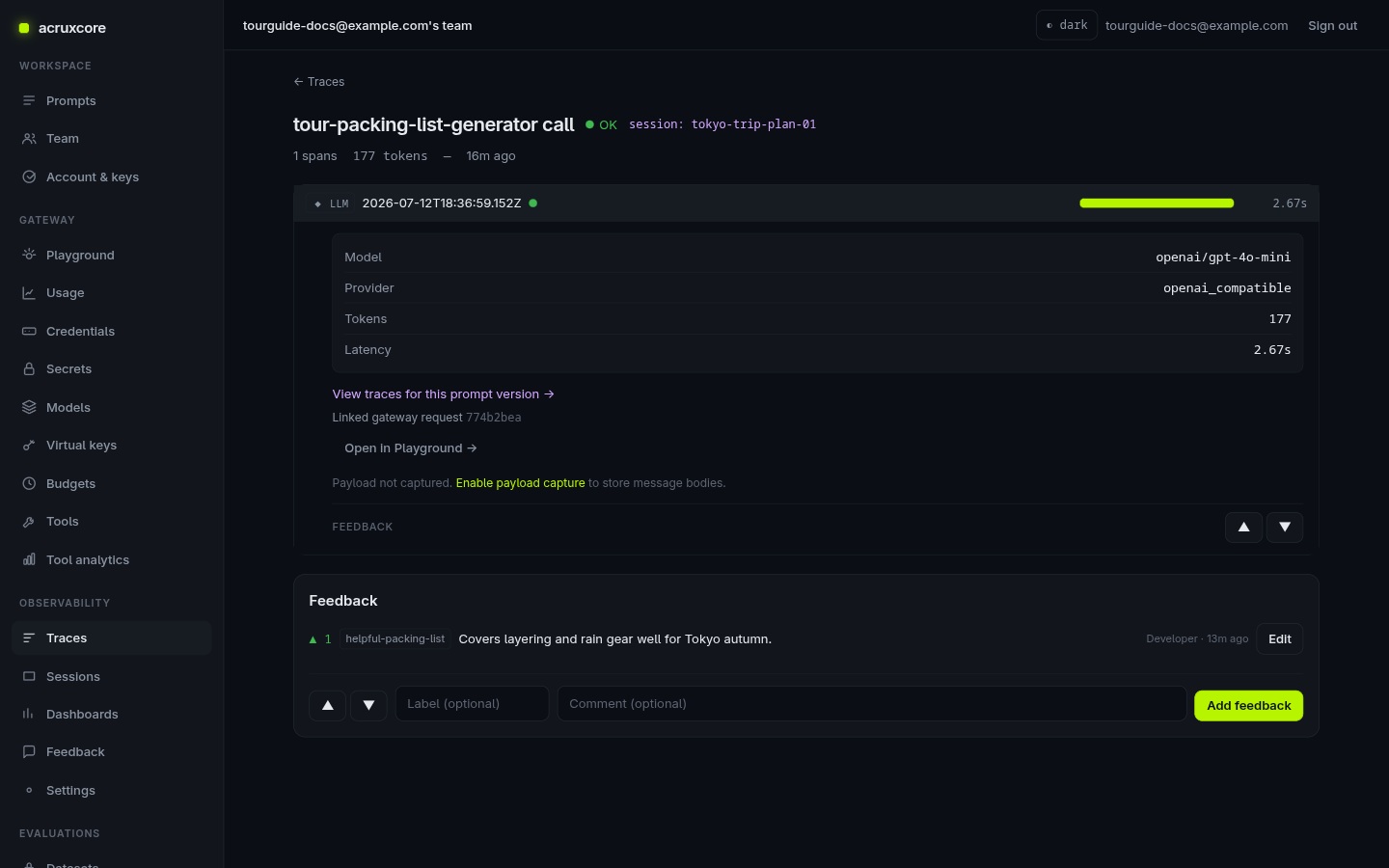
Click any trace's timestamp to open it. Expand the LLM span to see the resolved model, token usage, latency — and a link back to the prompt version that produced this exact call.
4. Leave feedback
Scroll to the Feedback panel at the bottom of the trace (or use the thumbs on an individual span, if you want feedback scoped to just that unit of work). Pick thumbs up or down, optionally add a short label and comment, then submit.
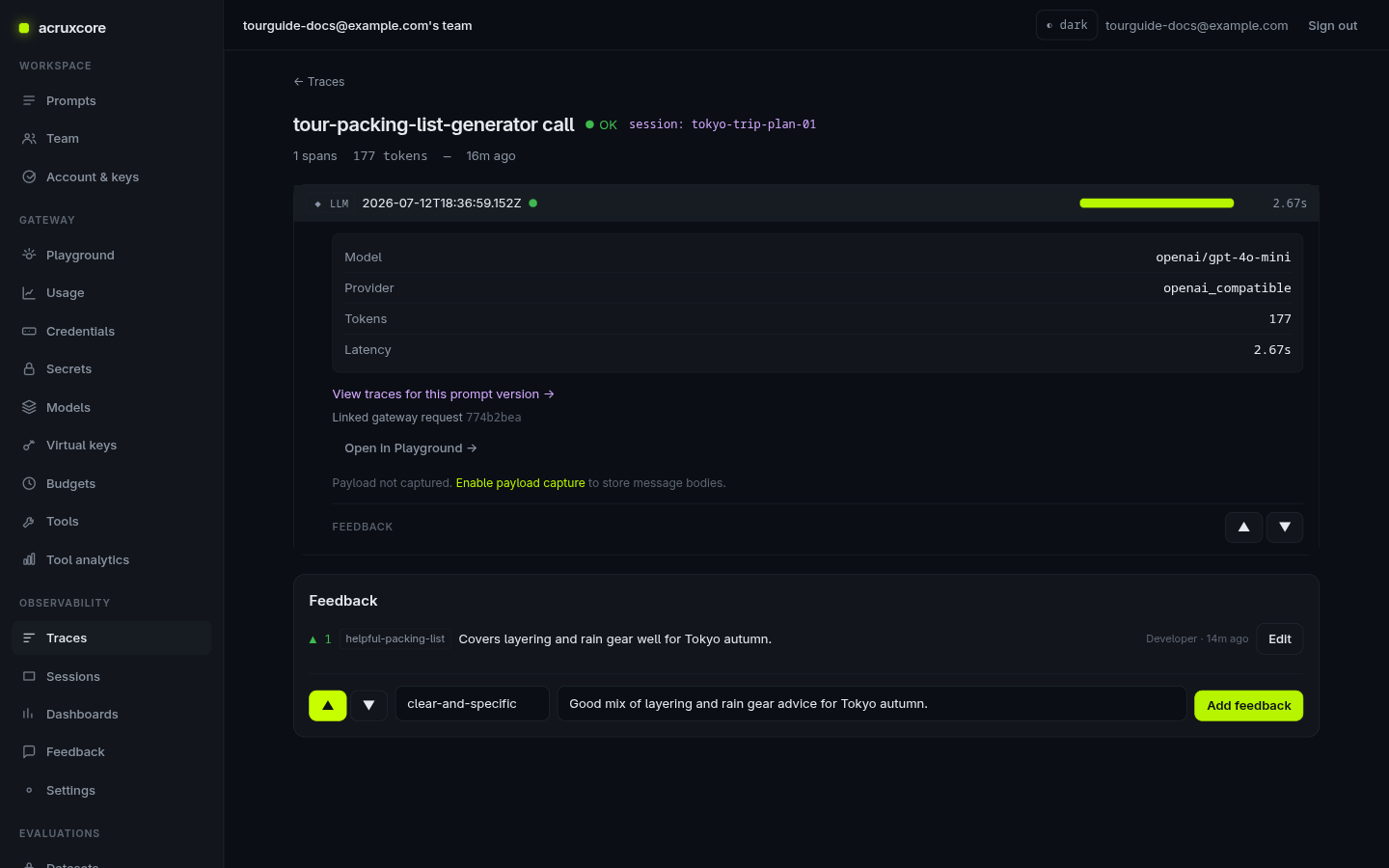
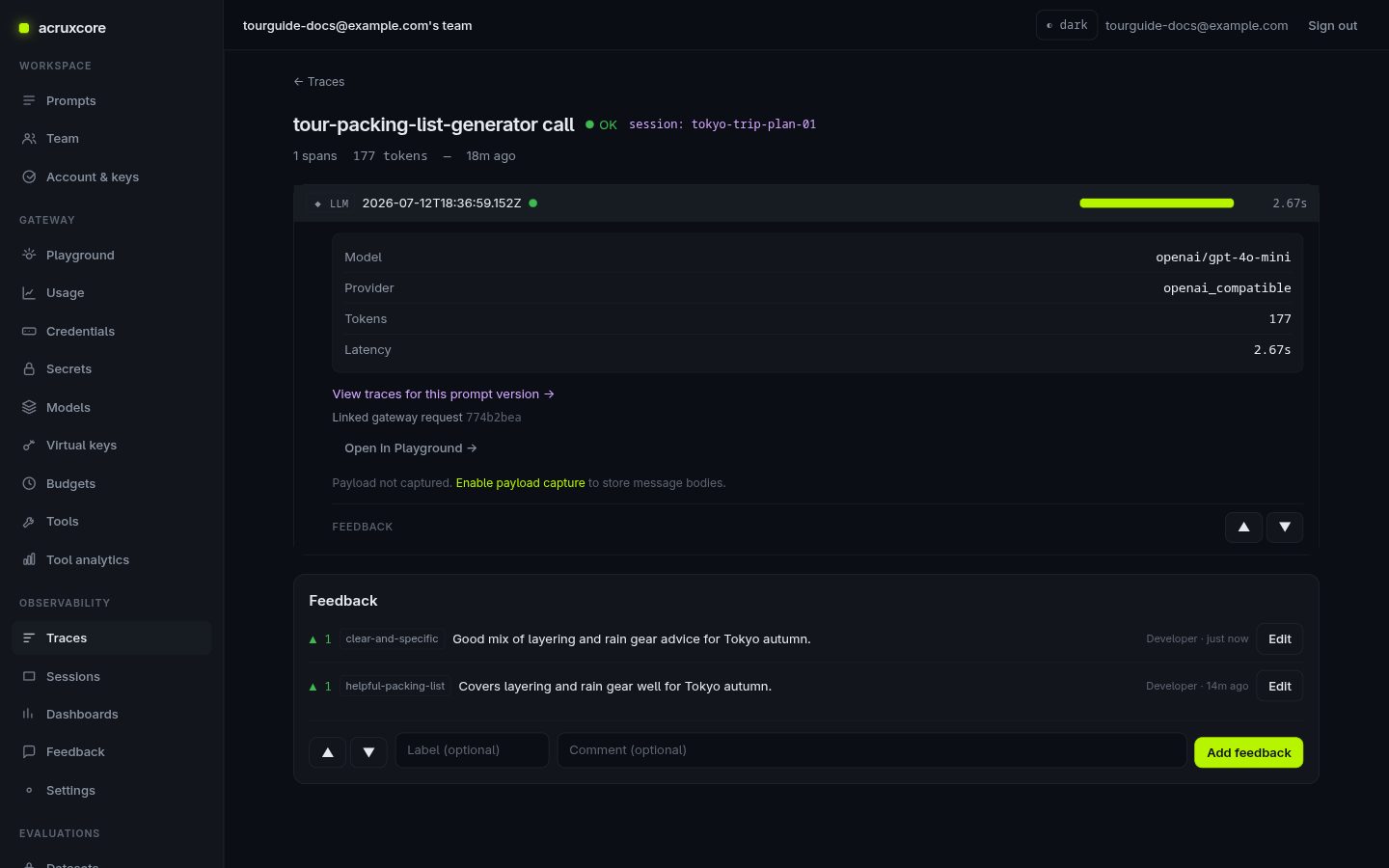
Once saved, your feedback appears in the list above the form, and the expanded span shows a "View traces for this prompt version →" link — this is the path back to the prompt.
5. Navigate back to the prompt
Click that link. It takes you to the Traces list pre-filtered to only calls made against that one prompt version — confirming exactly which version this feedback belongs to.
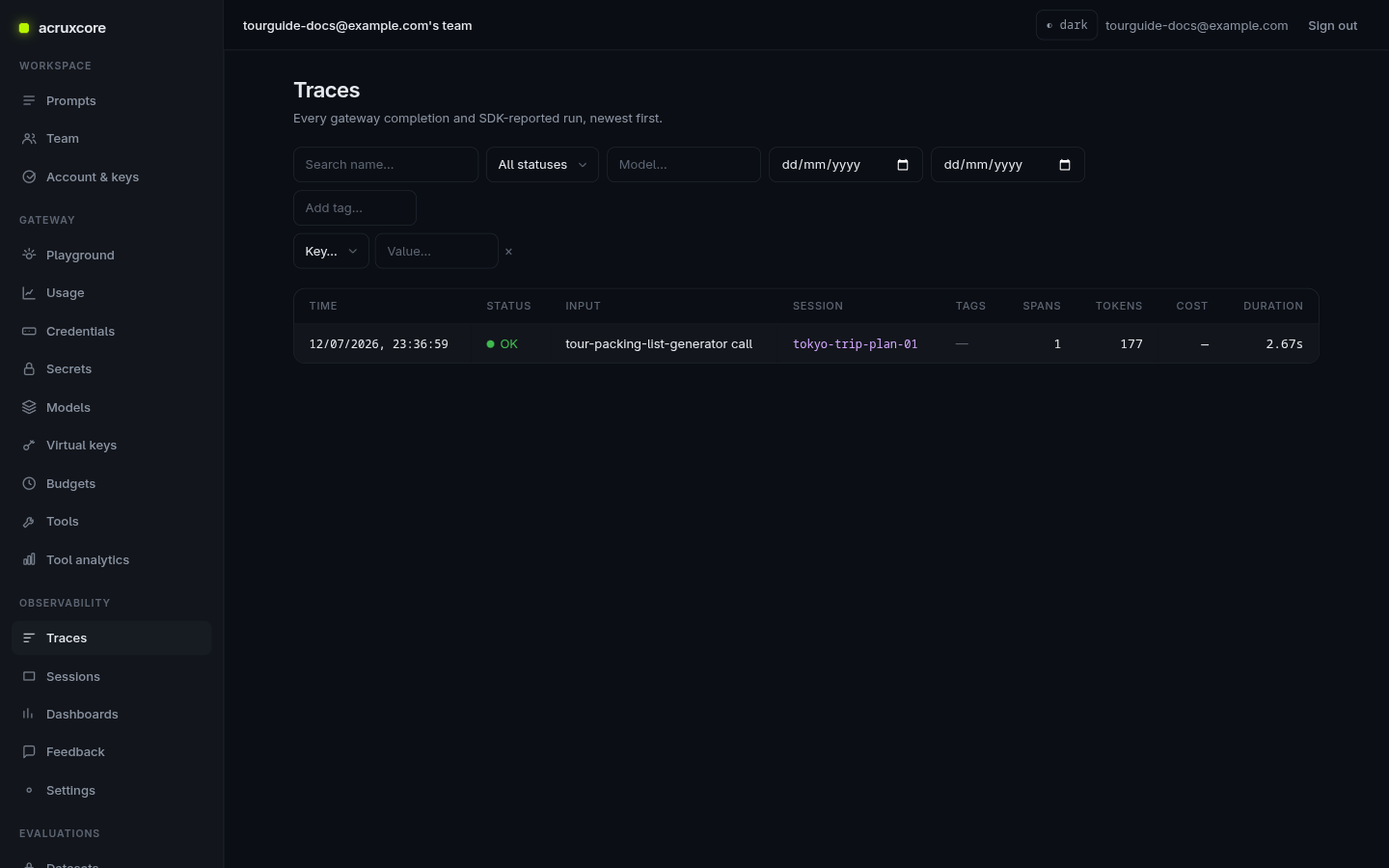
From there, open Prompts and pick the same prompt by name (here,
tour-packing-list-generator) to go straight to its versions, aliases, and
editor — closing the loop from a piece of feedback all the way back to the
prompt that earned it.
Doing this over the API
Sessions and feedback are both first-class API resources, so you can build the same flow — call, group, read back, and record feedback — entirely from code.
- curl
- Node (SDK)
- Python (SDK)
# List sessions
curl "$ACRUXCORE_BASE_URL/sessions" \
  -H "Authorization: Bearer $ACRUXCORE_API_KEY"
{
  "data": [
    {
      "sessionId": "tokyo-trip-plan-01",
      "traceCount": 3,
      "totalCostUsd": null,
      "totalTokens": 461,
      "firstAt": "2026-07-12T18:36:44.950Z",
      "lastAt": "2026-07-12T18:36:59.152Z"
    }
  ],
  "total": 1,
  "page": 1,
  "limit": 20
}
# Get one session and its traces
curl "$ACRUXCORE_BASE_URL/sessions/tokyo-trip-plan-01" \
  -H "Authorization: Bearer $ACRUXCORE_API_KEY"
{
  "session": {
    "sessionId": "tokyo-trip-plan-01",
    "traceCount": 3,
    "totalCostUsd": null,
    "totalTokens": 461,
    "firstAt": "2026-07-12T18:36:44.950Z",
    "lastAt": "2026-07-12T18:36:59.152Z"
  },
  "traces": [
    {
      "id": "bede0c1b-3d8e-40ef-950d-f5198f453ee7",
      "name": "tour-packing-list-generator call",
      "sessionId": "tokyo-trip-plan-01",
      "status": "ok",
      "spanCount": 1,
      "totalTokens": 177
    }
  ]
}
# Leave feedback on a trace (omit spanId for whole-trace feedback)
curl -X POST "$ACRUXCORE_BASE_URL/traces/bede0c1b-3d8e-40ef-950d-f5198f453ee7/feedback" \
  -H "Authorization: Bearer $ACRUXCORE_API_KEY" \
  -H "Content-Type: application/json" \
  -d '{"rating":1,"label":"helpful-packing-list","comment":"Covers layering and rain gear well for Tokyo autumn."}'
{
  "id": "be698c98-11f5-47a4-bfb7-df692da87c82",
  "traceId": "bede0c1b-3d8e-40ef-950d-f5198f453ee7",
  "spanId": null,
  "rating": 1,
  "label": "helpful-packing-list",
  "comment": "Covers layering and rain gear well for Tokyo autumn.",
  "source": "user",
  "createdAt": "2026-07-12T18:40:23.697Z"
}
source defaults to "user" when omitted from the request, as it is above —
it also accepts "developer", "end_user", or "api" if you want to record
where feedback actually came from.
Feedback also aggregates: an average rating grouped by model or prompt version, and a team-wide raw feed across every trace.
# Average rating + counts, grouped by model
curl "$ACRUXCORE_BASE_URL/traces/feedback/summary?group_by=model" \
  -H "Authorization: Bearer $ACRUXCORE_API_KEY"
{
  "groupBy": "model",
  "buckets": [{ "key": "gpt-4o-mini", "count": 2, "avgRating": 0, "downCount": 1 }]
}
# Team-wide feedback feed, newest first
curl "$ACRUXCORE_BASE_URL/traces/feedback?limit=5" \
  -H "Authorization: Bearer $ACRUXCORE_API_KEY"
{
  "data": [
    { "id": "68812680-562a-4ef5-8c72-a076da209afe", "traceId": "d65be577-5701-4ea5-97b0-995815d89226", "spanId": null, "rating": -1, "label": "too-verbose", "comment": null, "source": "developer", "createdBy": "a41d471d-7752-4795-bf59-79ef44ac67f3", "createdAt": "2026-08-04T19:26:21.478Z", "updatedAt": "2026-08-04T19:26:21.478Z" },
    { "id": "5dfcf43a-8ad5-480d-a244-12592542acaa", "traceId": "d65be577-5701-4ea5-97b0-995815d89226", "spanId": null, "rating": 1, "label": "helpful-answer", "comment": "Clear and accurate.", "source": "user", "createdBy": "a41d471d-7752-4795-bf59-79ef44ac67f3", "createdAt": "2026-08-04T19:26:21.459Z", "updatedAt": "2026-08-04T19:26:21.459Z" }
  ],
  "total": 2,
  "page": 1,
  "limit": 5
}
avgRating counts non-null ratings only (downCount is the number rated
below zero); a group with no feedback yet is simply absent from buckets.
The SDK's hub.gateway.chat() and hub.gateway.runToolLoop() take raw model + messages, not a
stored-prompt reference — so to call a prompt by name under a session, use
the gateway request above. To group your own SDK calls into a session instead,
pass the same sessionId in trace: on every call. runToolLoop forwards it
to the gateway as x-session-id, and the gateway stamps the session on the
trace it records — so every turn you tag with that id rolls up together.
import AcruxCore from '@acruxcoreai/sdk';

const hub = new AcruxCore();

// Each runToolLoop with the same sessionId lands in the same session.
const { traceId } = await hub.gateway.runToolLoop({
  model: 'gpt-4o-mini',
  messages: [{ role: 'user', content: 'Plan a 3-day trip to Tokyo.' }],
  trace: { sessionId: 'tokyo-trip-plan-01' },
});

// Read the session back — hub.sessions, not hub.traces.list.
const { data } = await hub.sessions.list({ q: 'tokyo' });
const detail = await hub.sessions.get('tokyo-trip-plan-01');

// Leave feedback on the trace.
await hub.traces.submitFeedback({
  traceId,
  rating: 1,
  label: 'helpful-packing-list',
  comment: 'Covers layering and rain gear well for Tokyo autumn.',
});
Real output for the two session reads above, from a session with three tour-planner traces already in it:
// hub.sessions.list({ q: 'tokyo' })
{
  "data": [
    { "sessionId": "tokyo-trip-plan-01", "traceCount": 3, "totalCostUsd": null, "totalTokens": 387, "firstAt": "2026-08-04T19:28:33.000Z", "lastAt": "2026-08-04T19:38:26.000Z" }
  ],
  "total": 1,
  "page": 1,
  "limit": 20
}
// hub.sessions.get('tokyo-trip-plan-01')
{
  "session": { "sessionId": "tokyo-trip-plan-01", "traceCount": 3, "totalCostUsd": null, "totalTokens": 387, "firstAt": "2026-08-04T19:28:33.000Z", "lastAt": "2026-08-04T19:38:26.000Z" },
  "traces": [
    { "id": "725cc929-682a-455c-80c1-ce2cd6b92a08", "name": "tour-budget-estimator call", "sessionId": "tokyo-trip-plan-01", "status": "ok", "startedAt": "2026-08-04T19:38:26.000Z", "endedAt": "2026-08-04T19:38:26.000Z", "spanCount": 1, "totalCostUsd": null, "totalTokens": 90, "tags": [] },
    { "id": "80b3dbaa-2429-421f-b9b5-71c1e1f43775", "name": "tour-packing-list-generator call", "sessionId": "tokyo-trip-plan-01", "status": "ok", "startedAt": "2026-08-04T19:38:26.000Z", "endedAt": "2026-08-04T19:38:26.000Z", "spanCount": 1, "totalCostUsd": null, "totalTokens": 177, "tags": [] },
    { "id": "c59981ab-9c28-433c-b54f-cef6ca55accf", "name": "tour-itinerary-planner call", "sessionId": "tokyo-trip-plan-01", "status": "ok", "startedAt": "2026-08-04T19:28:33.000Z", "endedAt": "2026-08-04T19:28:33.000Z", "spanCount": 1, "totalCostUsd": null, "totalTokens": 120, "tags": [] }
  ]
}
Feedback aggregates the same way as the curl example above:
const summary = await hub.traces.getFeedbackSummary({ groupBy: 'model' });
console.log(summary);
// { groupBy: 'model', buckets: [ { key: 'gpt-4o-mini', count: 2, avgRating: 0, downCount: 1 } ] }

const feedback = await hub.traces.listFeedback({ limit: 5 });
console.log(feedback.total); // 2
import asyncio
from acruxcore import AcruxCore


async def main():
    hub = AcruxCore()

    # Each run_tool_loop with the same session_id lands in the same session.
    result = await hub.gateway.run_tool_loop(
        model="gpt-4o-mini",
        messages=[{"role": "user", "content": "Plan a 3-day trip to Tokyo."}],
        trace={"session_id": "tokyo-trip-plan-01"},
    )

    # Read the session back — hub.sessions, not hub.traces.list.
    sessions = await hub.sessions.list(q="tokyo")
    detail = await hub.sessions.get("tokyo-trip-plan-01")

    # Leave feedback on the trace.
    await hub.traces.submit_feedback(
        result.trace_id,
        rating=1,
        label="helpful-packing-list",
        comment="Covers layering and rain gear well for Tokyo autumn.",
    )

    # Feedback aggregates the same way as the curl example above.
    summary = await hub.traces.get_feedback_summary(group_by="model")
    feedback = await hub.traces.list_feedback(limit=5)


asyncio.run(main())
Real output for sessions, detail, summary, and feedback.total above,
same session as the Node example:
>>> sessions
SessionListResult(data=[SessionSummary(session_id='tokyo-trip-plan-01', trace_count=3, total_cost_usd=None, total_tokens=387, first_at='2026-08-04T19:28:33.000Z', last_at='2026-08-04T19:38:26.000Z')], total=1, page=1, limit=20)

>>> detail
SessionDetailResult(session=SessionSummary(session_id='tokyo-trip-plan-01', trace_count=3, total_cost_usd=None, total_tokens=387, first_at='2026-08-04T19:28:33.000Z', last_at='2026-08-04T19:38:26.000Z'), traces=[SessionTraceItem(id='725cc929-682a-455c-80c1-ce2cd6b92a08', name='tour-budget-estimator call', session_id='tokyo-trip-plan-01', status='ok', started_at='2026-08-04T19:38:26.000Z', ended_at='2026-08-04T19:38:26.000Z', span_count=1, total_cost_usd=None, total_tokens=90, tags=[]), SessionTraceItem(id='80b3dbaa-2429-421f-b9b5-71c1e1f43775', name='tour-packing-list-generator call', session_id='tokyo-trip-plan-01', status='ok', started_at='2026-08-04T19:38:26.000Z', ended_at='2026-08-04T19:38:26.000Z', span_count=1, total_cost_usd=None, total_tokens=177, tags=[]), SessionTraceItem(id='c59981ab-9c28-433c-b54f-cef6ca55accf', name='tour-itinerary-planner call', session_id='tokyo-trip-plan-01', status='ok', started_at='2026-08-04T19:28:33.000Z', ended_at='2026-08-04T19:28:33.000Z', span_count=1, total_cost_usd=None, total_tokens=120, tags=[])])

>>> summary
FeedbackSummaryResult(group_by='model', buckets=[FeedbackBucket(key='gpt-4o-mini', count=2, avg_rating=0, down_count=1)])

>>> feedback.total
2
What's next
- Haven't inspected a single trace yet? Start with Trace and inspect an LLM call.
- Turn feedback into training data: evaluate a prompt.
- Stream responses and run a traced tool-calling loop from Node: chat, stream, and collect feedback with the SDK.
- Now that you have traces and sessions, see the aggregate picture:
View trace analytics —
group_by=sessionreads the same session ids this guide sets up. - Full field reference: Sessions and Traces in the API Reference.