Store prompts and tools via the API
What you'll build: a travel-assistant prompt with three tools connected to
it — all saved through the REST API — then fetched and run from the SDK, finishing
with a reply streamed to your terminal token by token.
In acruxcore, prompts and tools are versioned catalog resources: a prompt
holds templated messages, a tool holds a JSON schema the model reads, and a
binding connects the two so they travel together. You can author both
in the dashboard, but you can also create them entirely over the REST API — which
is what this guide does. At run time your app fetches them by name with the
@acruxcoreai/sdk, so the prompt text and tool schemas live on the server, not
hard-coded in your code.
Everything here maps to two runnable example files in the SDK, embedded in full
below: rest-defined-agent.ts (store → fetch → run) and
stream-a-stored-prompt.ts (streaming).
1. Set your API key and base URL
Every request authenticates with a Bearer API key. Create one under
Gateway → Keys (or Account → API keys), then export it along with the API
base URL so both curl and the SDK can read them:
export ACRUXCORE_API_KEY=<your api key>
export ACRUXCORE_BASE_URL=https://api.acruxcore.com/api/v1
The same Bearer key works for the REST calls below and for the SDK. Write
operations (creating prompts, tools, and versions) need an owner, admin, or
editor role — a viewer key gets 403.
2. Store a tool
A tool is created in two steps: a shell (name + description) and then an
immutable version that carries the JSON schema the model reads. Here is
get_weather.
First the shell:
curl -X POST "$ACRUXCORE_BASE_URL/tools" \
  -H "Authorization: Bearer $ACRUXCORE_API_KEY" \
  -H "Content-Type: application/json" \
  -d '{"name":"get_weather","description":"Get the current weather for a city."}'
{
  "id": "94ade16a-a242-4374-a0c8-4e773a450296",
  "name": "get_weather",
  "description": "Get the current weather for a city.",
  "teamId": "86b81746-fd2d-4b2b-914b-0af7c89ac02f",
  "createdBy": "78f42468-a5a6-4f7e-82d3-0c113f87659f",
  "createdAt": "2026-07-14T10:48:23.757Z"
}
Then a version. The parametersSchema is the standard JSON Schema the model
reads to decide how to call the tool. The executor says who runs it —
{ "type": "client" } means your own app runs the tool (your clientTools
function, shown later), so the platform only stores the schema.
curl -X POST "$ACRUXCORE_BASE_URL/tools/94ade16a-a242-4374-a0c8-4e773a450296/versions" \
  -H "Authorization: Bearer $ACRUXCORE_API_KEY" \
  -H "Content-Type: application/json" \
  -d '{
    "description": "Get the current weather for a city.",
    "parametersSchema": {"type":"object","properties":{"city":{"type":"string","description":"City name, e.g. \"Tokyo\"."}},"required":["city"]},
    "executor": {"type":"client"}
  }'
The first version auto-creates production and staging aliases pointing at
it:
{
  "id": "a314b29e-f828-43ad-b18d-9eda6a3c5cf8",
  "toolId": "94ade16a-a242-4374-a0c8-4e773a450296",
  "versionNumber": 1,
  "description": "Get the current weather for a city.",
  "parametersSchema": {
    "type": "object",
    "required": ["city"],
    "properties": { "city": { "type": "string", "description": "City name, e.g. \"Tokyo\"." } }
  },
  "executor": { "type": "client" },
  "createdBy": "78f42468-a5a6-4f7e-82d3-0c113f87659f",
  "createdAt": "2026-07-14T10:48:23.812Z",
  "aliases": [
    { "alias": "production", "versionId": "a314b29e-f828-43ad-b18d-9eda6a3c5cf8", "versionNumber": 1 },
    { "alias": "staging", "versionId": "a314b29e-f828-43ad-b18d-9eda6a3c5cf8", "versionNumber": 1 }
  ]
}
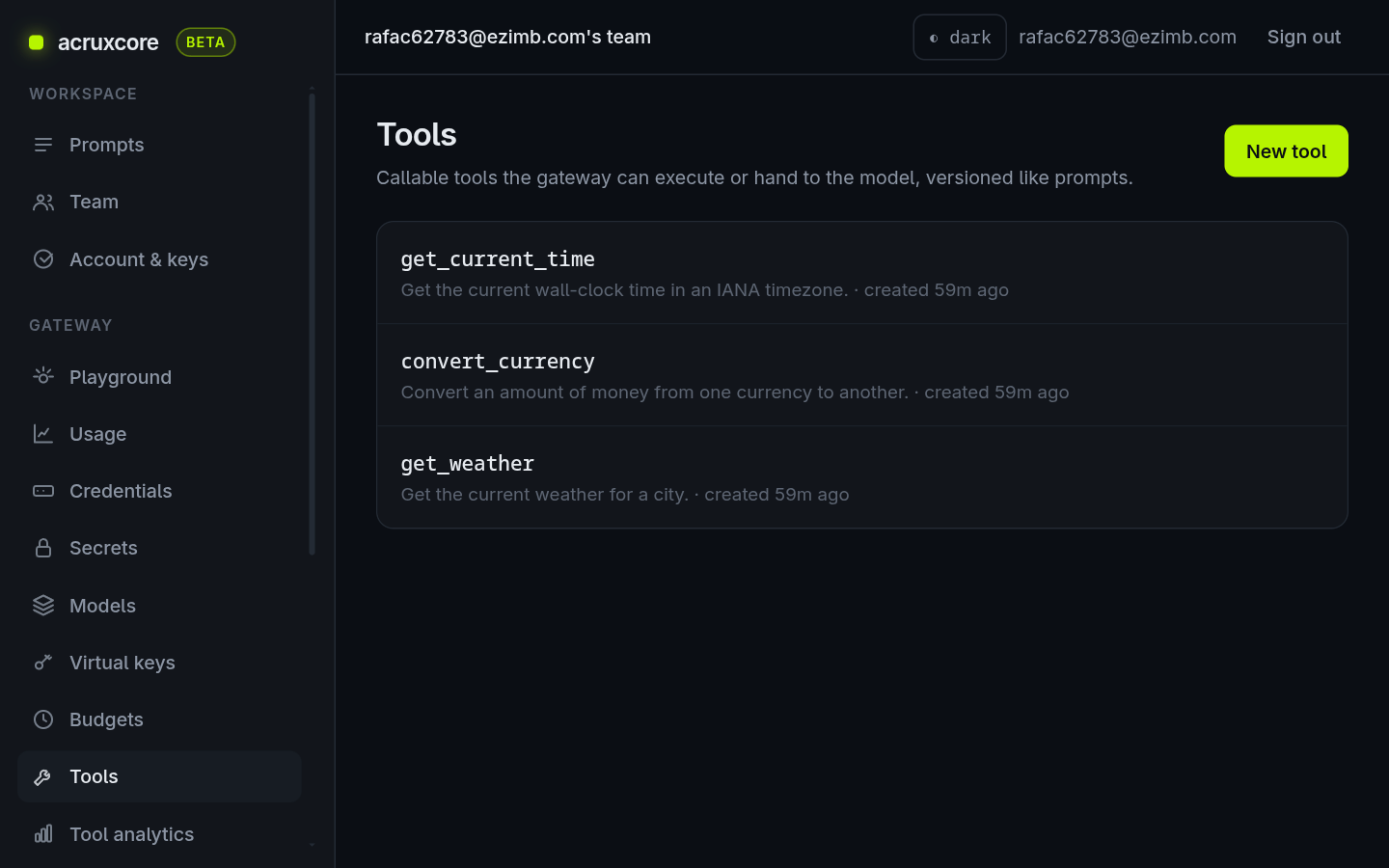
The example stores three tools this way — get_weather, convert_currency, and
get_current_time — each with the same shell-then-version shape.
The shell-then-version-then-promote sequence above is shown because this guide is
about the raw API. If you only want the catalog to match a spec you already have,
POST /tools/sync does all of it in one idempotent
call: it creates the tool when the name is new, commits a version only when the spec
differs from the live one, and moves the alias when it commits. Re-running it with an
unchanged spec changes nothing.
3. Store the prompt and connect the tools
Three steps: a prompt shell, a version with the templated messages, then a
binding per tool. The {{ city }}-style placeholders are
nunjucks variables the server fills in at
render time. Bindings hang off the prompt rather than the version, so changing which
tools it calls never needs a new commit.
curl -X POST "$ACRUXCORE_BASE_URL/prompts" \
  -H "Authorization: Bearer $ACRUXCORE_API_KEY" \
  -H "Content-Type: application/json" \
  -d '{"name":"travel-assistant","description":"Travel assistant used by the rest-defined-agent SDK example."}'
{
  "id": "bf43ef76-e2cf-48ec-a37b-dd03f0edba97",
  "name": "travel-assistant",
  "description": "Travel assistant used by the rest-defined-agent SDK example.",
  "teamId": "86b81746-fd2d-4b2b-914b-0af7c89ac02f",
  "createdBy": "78f42468-a5a6-4f7e-82d3-0c113f87659f",
  "createdAt": "2026-07-14T10:48:38.209Z"
}
Now the version — messages only, since tools are wired to the prompt separately:
curl -X POST "$ACRUXCORE_BASE_URL/prompts/bf43ef76-e2cf-48ec-a37b-dd03f0edba97/versions" \
  -H "Authorization: Bearer $ACRUXCORE_API_KEY" \
  -H "Content-Type: application/json" \
  -d '{
    "messages": [
      {"role":"system","content":"You are a helpful travel assistant. Use the provided tools to answer with concrete, up-to-date facts instead of guessing."},
      {"role":"user","content":"What'"'"'s the weather in {{ city }} right now, what time is it there, and how much is {{ amount }} {{ from }} in {{ to }}?"}
    ]
  }'
The response confirms the version, the four variables the server extracted from
the template, and the auto-created aliases:
{
  "id": "0675fd3a-fe43-4203-a10d-178c7dab2b6b",
  "promptId": "bf43ef76-e2cf-48ec-a37b-dd03f0edba97",
  "versionNumber": 1,
  "messages": [
    { "role": "system", "content": "You are a helpful travel assistant. ..." },
    { "role": "user", "content": "What's the weather in ... {{ city }} ... {{ amount }} {{ from }} ... {{ to }}?" }
  ],
  "variables": ["amount", "city", "from", "to"],
  "model": null,
  "aliases": [
    { "alias": "production", "versionId": "0675fd3a-fe43-4203-a10d-178c7dab2b6b", "versionNumber": 1 },
    { "alias": "staging", "versionId": "0675fd3a-fe43-4203-a10d-178c7dab2b6b", "versionNumber": 1 }
  ]
}
Then connect the three tools. A binding is a live setting on the prompt, so this is
one PUT per tool and nothing needs committing afterwards. tool_alias names the
tool alias to follow, so a later tool commit reaches the prompt as soon as that
alias moves:
for TOOL in 94ade16a-a242-4374-a0c8-4e773a450296 \
            666c6d6d-ece8-47ac-93ff-21c7c3b8698b \
            3c4f9d29-7e47-4cfc-afc1-2b2bfd6fd92f; do
  curl -X PUT "$ACRUXCORE_BASE_URL/prompts/bf43ef76-e2cf-48ec-a37b-dd03f0edba97/tools/$TOOL" \
    -H "Authorization: Bearer $ACRUXCORE_API_KEY" \
    -H "Content-Type: application/json" \
    -d '{"tool_alias":"production"}'
done
Each call returns the binding it wrote, including the tool version it resolves to right now:
{
  "toolId": "94ade16a-a242-4374-a0c8-4e773a450296",
  "toolName": "get_weather",
  "toolAlias": "production",
  "pinnedVersionNumber": null,
  "off": false,
  "resolvedVersionNumber": 1,
  "position": 0
}
Steps 2 and 3 have a UI equivalent: the New tool and New prompt buttons create the shells, each detail page commits versions, and the prompt's Tools tab connects tools. The screenshots in the next step are that same dashboard — the API and the UI write to the same catalog.
4. Confirm they saved in the dashboard
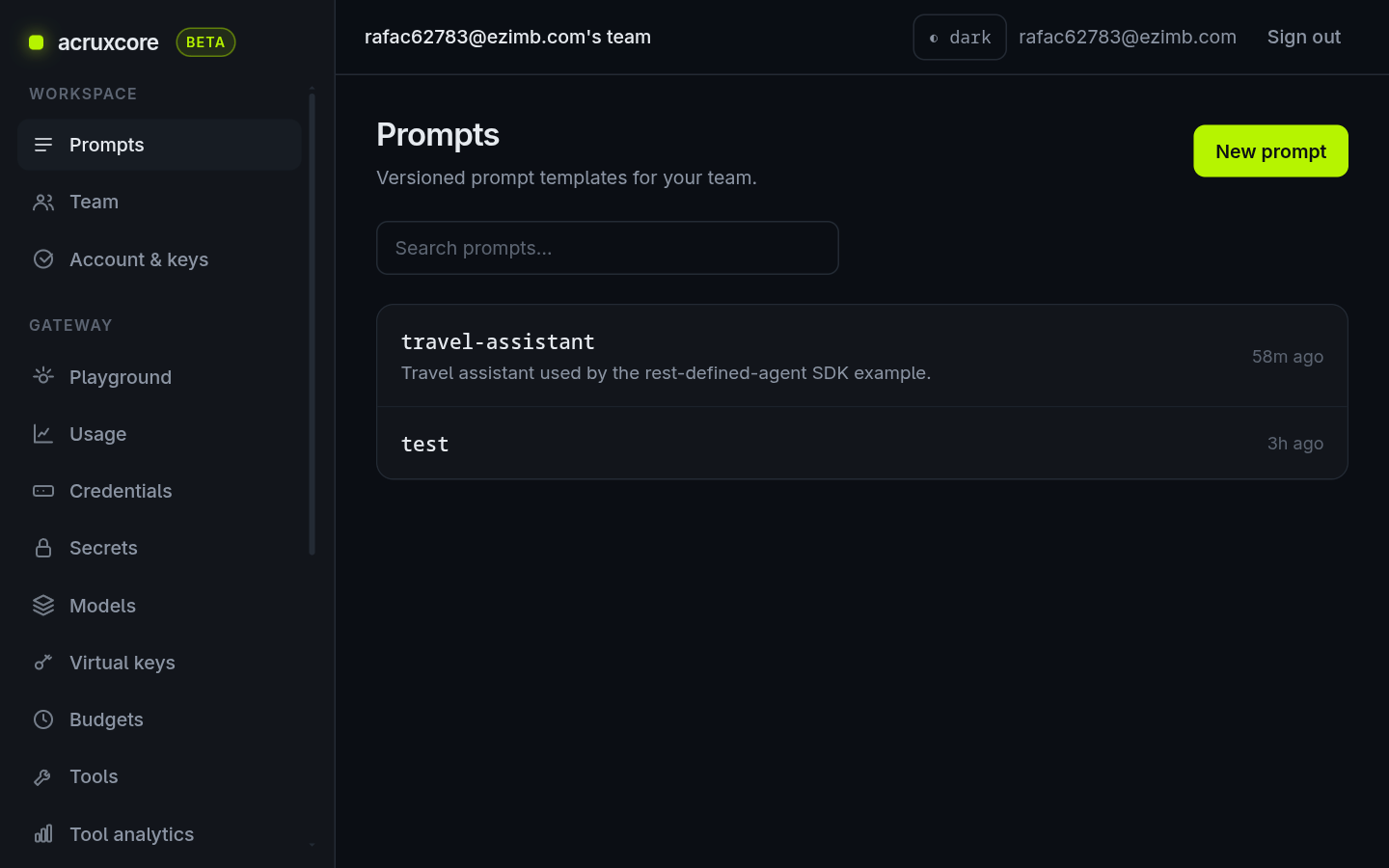
Open the web app to see what you just stored. The prompt shows up in the Prompts list:
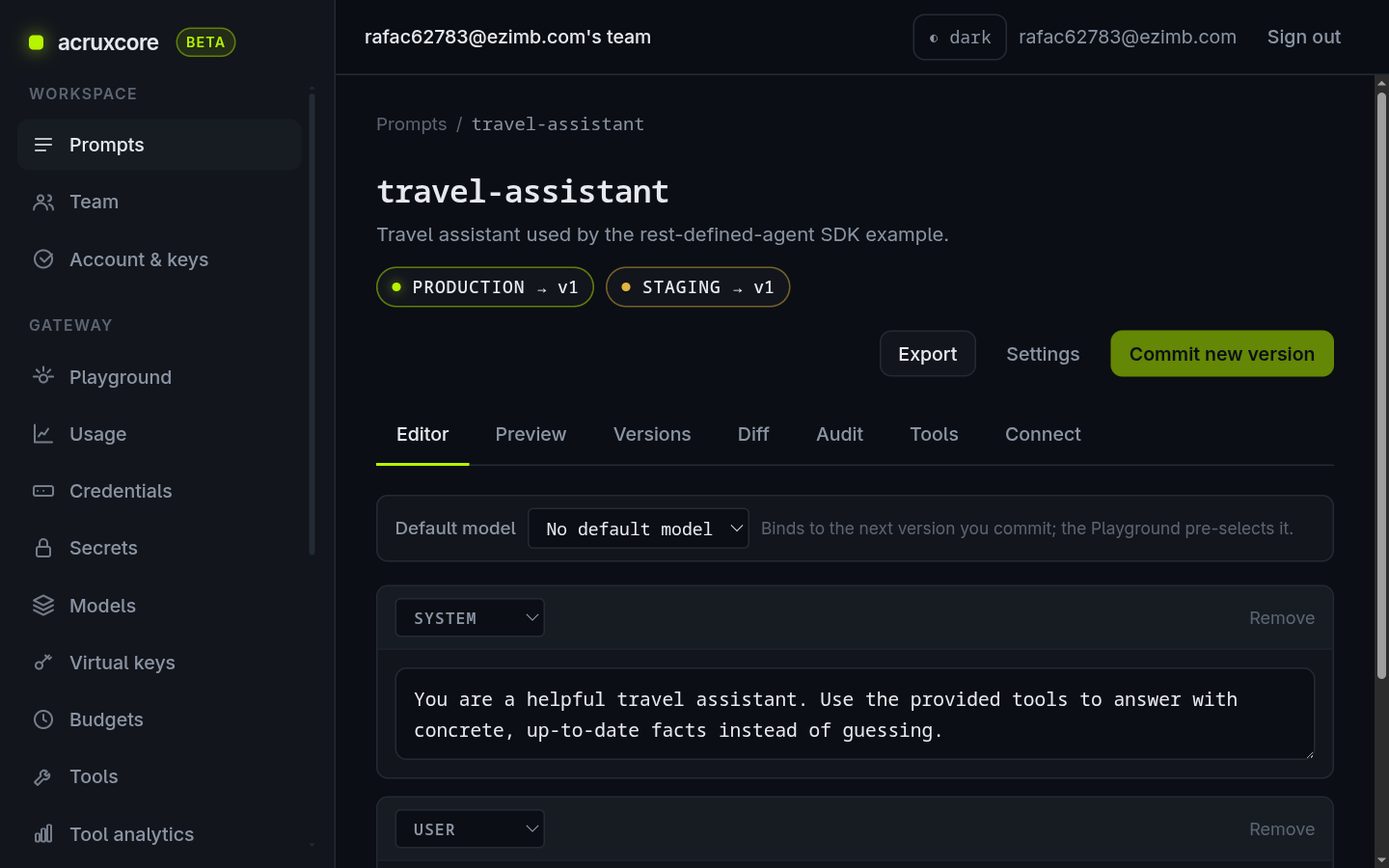
Open it and the Editor tab shows the two templated messages, the production
and staging aliases both pointing at v1, and the nunjucks variables in place:
The Tools tab confirms all three tools are connected, in the default column that every alias inherits:

The tools themselves live in Gateway → Tools:
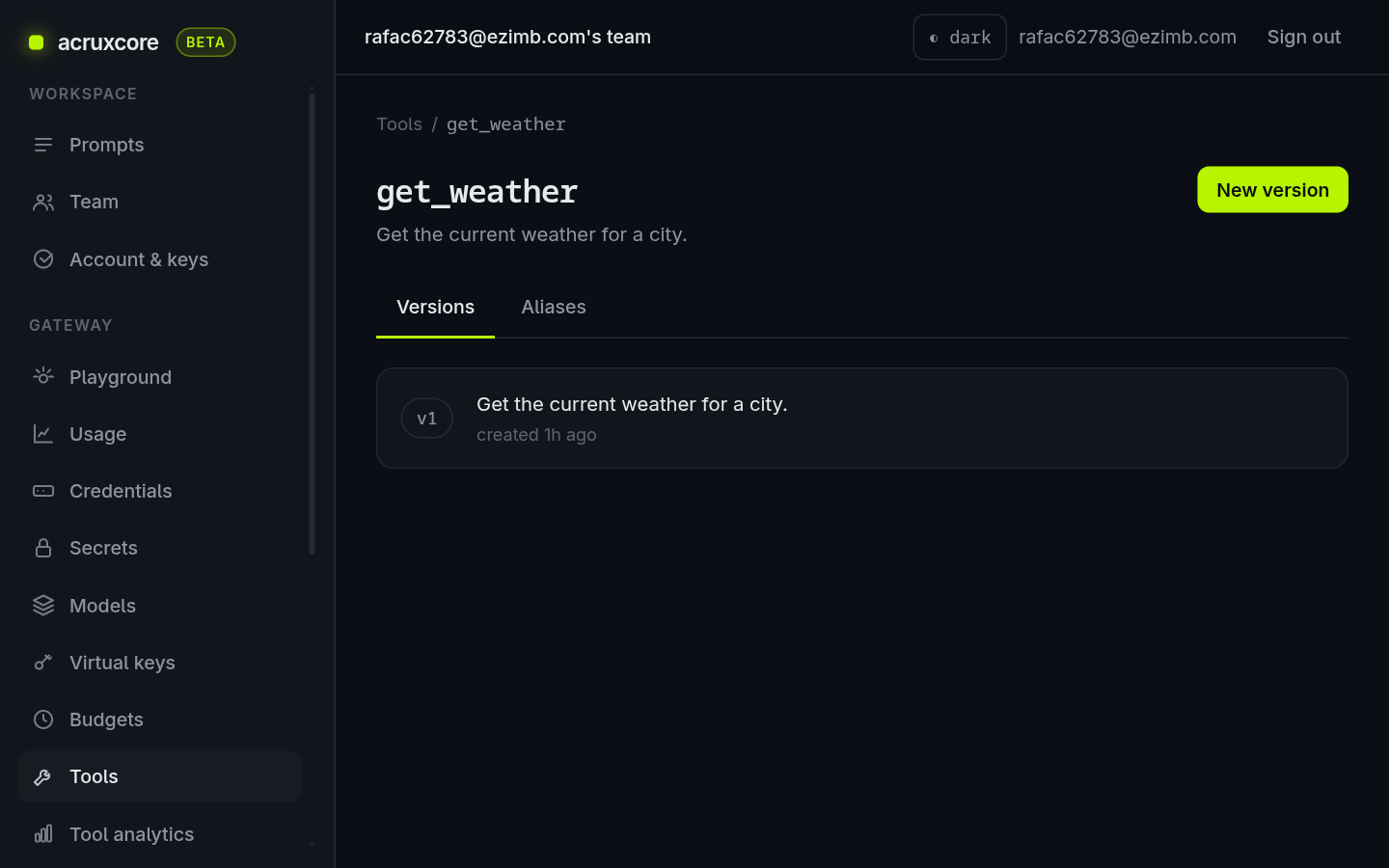
Opening get_weather shows its committed v1:
5. Fetch them from the SDK
Now the run path. A single hub.prompts.render(name, alias, variables) call returns
both the templated messages (variables already filled in server-side) and the
bound tool schemas, already in OpenAI shape:
- Node (SDK)
- Python (SDK)
import acruxcore from '@acruxcoreai/sdk';

const hub = new acruxcore(); // reads ACRUXCORE_API_KEY + ACRUXCORE_BASE_URL from env

const { messages, tools } = await hub.prompts.render('travel-assistant', 'production', {
  city: 'Tokyo',
  amount: 100,
  from: 'USD',
  to: 'JPY',
});
from acruxcore import AcruxCore

hub = AcruxCore()

messages, tools = await hub.prompts.render('travel-assistant', 'production', {
    'city': 'Tokyo',
    'amount': 100,
    'from': 'USD',
    'to': 'JPY',
})
messages comes back rendered and tools carries the three schemas you stored —
neither is defined in your code. This is the real output of the example's fetch
step:
Fetched from framework: 2 message(s) + 3 tool(s) [get_weather, convert_currency, get_current_time]
6. Run the agent
runPromptWithTools takes the render result, calls the model, and when the model asks
for a tool it runs the matching function from your clientTools map and feeds the result
back — looping until the model gives a final answer. The only tool code left in your
app is that map; the schemas and prompt text came from the server.
Here is the complete, runnable example — it does the store (steps 2–3), the fetch (step 5), and the run in one idempotent file:
- Node (SDK)
- Python (SDK)
Full source: rest-defined-agent.ts
/**
 * Example: store the system prompt AND the tools in the framework via REST, then
 * fetch both back through the SDK and run the agent — nothing about the prompt or
 * the tool schemas is hardcoded on the run path.
 *
 * The companion `multi-tool-agent.ts` hardcodes the tool JSON-schemas and the chat
 * messages inline. Here the flow is store → fetch → use:
 *
 *   STORE (REST, one-time setup):
 *     1. Tools  → POST /tools (shell) + POST /tools/:id/versions (schema). Each
 *        version stores the `parametersSchema` the model reads plus a
 *        `{ type: 'client' }` executor — "our own app runs this tool", so
 *        the {@link CLIENT_TOOLS} bodies below still run locally.
 *     2. Prompt → POST /prompts (shell) + POST /prompts/:id/versions with the
 *        templated messages, then PUT /prompts/:id/tools/:toolId per tool to BIND
 *        the catalog tools to the prompt. A version is the template; bindings are
 *        a live setting on the prompt, so nothing needs re-committing to change
 *        which tools it calls.
 *
 *   FETCH + USE (SDK, at run time):
 *     3. `hub.prompts.render(name, 'production', vars)` returns `{ messages, tools }` in
 *        one call: the messages are templated server-side and `tools` are the
 *        version's bound tool schemas, already in OpenAI shape. Both come from
 *        the framework — this file no longer holds them.
 *     4. `hub.gateway.runToolLoop({ messages, toolDefs })` runs the loop with exactly what was
 *        fetched. The only tool code left in this file is `CLIENT_TOOLS` — the local
 *        implementations. Schemas, descriptions, and the prompt text live on the
 *        server.
 *
 * This is the realistic split for a team: prompts and tool contracts are versioned
 * and edited in the platform by whoever owns them; the app ships just the
 * executable logic and fetches the rest by name.
 *
 * The setup is written as idempotent "ensure" helpers (find-by-name, create only
 * if missing) because names are NOT unique in the catalog — a naive re-run would
 * create duplicate rows and make name resolution ambiguous. Run it as many times
 * as you like; it converges to one prompt (with the three tools bound) + three
 * tools.
 *
 * Run:
 *   ACRUXCORE_API_KEY=<your key> \
 *   ACRUXCORE_BASE_URL=https://api.acruxcore.com/api/v1 \
 *   ACRUXCORE_MODEL=gpt-4o-mini \
 *   npx tsx packages/sdk/examples/rest-defined-agent.ts
 *
 * `ACRUXCORE_MODEL` must be a model your team has registered in the gateway; it
 * defaults to `gpt-4o-mini`.
 */

import acruxcore from '@acruxcoreai/sdk';

const apiKey = process.env.ACRUXCORE_API_KEY;
const baseUrl = process.env.ACRUXCORE_BASE_URL;
const model = process.env.ACRUXCORE_MODEL ?? 'gpt-4o-mini';

if (!apiKey || !baseUrl) {
  throw new Error('Set ACRUXCORE_API_KEY and ACRUXCORE_BASE_URL first.');
}

// `baseUrl` already ends in /api/v1; the SDK trims a trailing slash, so mirror that.
const restBase = baseUrl.replace(/\/+$/, '');

/**
 * Minimal Bearer-authenticated REST call against the acruxcore API. The SDK
 * covers render/chat/tool-loop/trace; catalog authoring (create prompt/tool,
 * commit versions) is plain REST, so we call it directly here.
 *
 * @param method - HTTP method.
 * @param path - Path under the API base, e.g. `/tools` or `/prompts/:id/versions`.
 * @param body - Optional JSON body; omitted for GET/DELETE.
 * @returns The parsed JSON response (or `undefined` for a 204).
 * @throws {Error} If the response status is not 2xx, with the server's error body.
 */
async function api<T>(method: string, path: string, body?: unknown): Promise<T> {
  const res = await fetch(`${restBase}${path}`, {
    method,
    headers: {
      Authorization: `Bearer ${apiKey}`,
      'Content-Type': 'application/json',
    },
    body: body === undefined ? undefined : JSON.stringify(body),
  });
  if (!res.ok) {
    const detail = await res.text().catch(() => '');
    throw new Error(`${method} ${path} → ${res.status}: ${detail}`);
  }
  if (res.status === 204) return undefined as T;
  return (await res.json()) as T;
}

/** A row as returned by the list endpoints — only the fields we read. */
interface NamedRow {
  id: string;
  name: string;
}
/** Shape of the paginated list responses. */
interface ListResponse {
  data: NamedRow[];
  total: number;
}

// ────────────────────────────────────────────────────────────────────────────
// Local tool implementations — the ONLY tool code left in this file. Their
// JSON-schemas live in the catalog and are fetched at run time (see main()).
// ────────────────────────────────────────────────────────────────────────────

/** Canned weather so the example runs without any external API or key. */
const WEATHER: Record<string, string> = {
  tokyo: '22°C, light rain',
  london: '15°C, overcast',
  'new york': '27°C, sunny',
};

/** Illustrative fixed rates (units of `to` per 1 unit of `from`). */
const RATES: Record<string, number> = {
  'USD:JPY': 157.0,
  'USD:EUR': 0.92,
  'EUR:USD': 1.09,
};

/**
 * The local body of every catalog tool this agent can run, keyed by catalog tool name.
 * The keys must match the tools bound to the prompt; the catalog holds their schemas and
 * deliberately no body, so this map is the whole of what the app contributes.
 */
const CLIENT_TOOLS: Record<string, (args: Record<string, unknown>) => unknown> = {
  get_weather: (args) => {
      const city = String(args.city ?? '').toLowerCase();
      return { city: args.city, conditions: WEATHER[city] ?? 'no data for that city' };
  },
  convert_currency: (args) => {
      const from = String(args.from ?? '').toUpperCase();
      const to = String(args.to ?? '').toUpperCase();
      const amount = Number(args.amount ?? 0);
      const rate = RATES[`${from}:${to}`];
      if (rate === undefined) return { error: `no rate for ${from}->${to}` };
      return { amount, from, to, converted: Math.round(amount * rate * 100) / 100, rate };
  },
  get_current_time: (args) => {
      const timezone = String(args.timezone ?? 'UTC');
      const time = new Intl.DateTimeFormat('en-GB', {
        timeZone: timezone,
        hour: '2-digit',
        minute: '2-digit',
        weekday: 'short',
      }).format(new Date());
      return { timezone, time };
  },
};

// ────────────────────────────────────────────────────────────────────────────
// Catalog definitions used ONLY to seed the framework (the STORE step). At run
// time the schemas come back from hub.prompts.render, not from here.
// ────────────────────────────────────────────────────────────────────────────

/** A tool we want in the catalog: its name/description plus the JSON-schema the model reads. */
interface ToolSpec {
  name: string;
  description: string;
  parametersSchema: Record<string, unknown>;
}

/**
 * The three tools, in the shape the catalog stores. Note there is no OpenAI
 * `{ type: 'function', function: {...} }` wrapper here — the catalog stores the
 * bare `parametersSchema`, and render wraps it when it returns bound tools.
 */
const TOOL_SPECS: ToolSpec[] = [
  {
    name: 'get_weather',
    description: 'Get the current weather for a city.',
    parametersSchema: {
      type: 'object',
      properties: { city: { type: 'string', description: 'City name, e.g. "Tokyo".' } },
      required: ['city'],
    },
  },
  {
    name: 'convert_currency',
    description: 'Convert an amount of money from one currency to another.',
    parametersSchema: {
      type: 'object',
      properties: {
        amount: { type: 'number', description: 'The amount to convert.' },
        from: { type: 'string', description: 'ISO 4217 source currency, e.g. "USD".' },
        to: { type: 'string', description: 'ISO 4217 target currency, e.g. "JPY".' },
      },
      required: ['amount', 'from', 'to'],
    },
  },
  {
    name: 'get_current_time',
    description: 'Get the current wall-clock time in an IANA timezone.',
    parametersSchema: {
      type: 'object',
      properties: {
        timezone: { type: 'string', description: 'IANA timezone, e.g. "Asia/Tokyo".' },
      },
      required: ['timezone'],
    },
  },
];

const PROMPT_NAME = 'travel-assistant';

/**
 * The prompt version's messages, with nunjucks `{{ variables }}` the server fills
 * at render time. Seed data only — after the first run this text lives in the
 * catalog and is fetched via hub.prompts.render.
 */
const PROMPT_MESSAGES = [
  {
    role: 'system' as const,
    content:
      'You are a helpful travel assistant. Use the provided tools to answer with ' +
      'concrete, up-to-date facts instead of guessing.',
  },
  {
    role: 'user' as const,
    content:
      "What's the weather in {{ city }} right now, what time is it there, and how " +
      'much is {{ amount }} {{ from }} in {{ to }}?',
  },
];

// ────────────────────────────────────────────────────────────────────────────
// STORE (idempotent): create each resource only if a same-named one is missing.
// ────────────────────────────────────────────────────────────────────────────

/**
 * Ensures a catalog tool with `spec.name` exists and has at least one committed
 * version, and returns its id. Safe to call repeatedly: it finds an existing tool
 * by exact name and only creates the shell/version that is missing.
 *
 * @param spec - The tool name, description, and parameters schema to converge to.
 * @returns The tool's id (used to bind it to the prompt).
 * @throws {Error} On any non-2xx REST response.
 */
async function ensureTool(spec: ToolSpec): Promise<string> {
  const found = await api<ListResponse>(
    'GET',
    `/tools?search=${encodeURIComponent(spec.name)}`,
  );
  let tool = found.data.find((t) => t.name === spec.name);

  if (!tool) {
    tool = await api<NamedRow>('POST', '/tools', {
      name: spec.name,
      description: spec.description,
    });
    console.log(`  + created tool "${spec.name}"`);
  }

  const versions = await api<ListResponse>('GET', `/tools/${tool.id}/versions`);
  if (versions.total === 0) {
    // `{ type: 'client' }` = our own app executes the tool (see CLIENT_TOOLS); the
    // platform stores the schema but never calls it itself. The first version
    // auto-creates the `production` alias the prompt's binding resolves against.
    await api('POST', `/tools/${tool.id}/versions`, {
      description: spec.description,
      parametersSchema: spec.parametersSchema,
      executor: { type: 'client' },
    });
    console.log(`  + committed v1 for tool "${spec.name}"`);
  }

  return tool.id;
}

/**
 * Ensures a prompt named {@link PROMPT_NAME} exists with a committed version that
 * carries {@link PROMPT_MESSAGES}, and that the given catalog tools are bound to
 * it. Idempotent, like {@link ensureTool}.
 *
 * @param toolIds - Catalog tool ids to bind to the prompt (from {@link ensureTool}).
 * @throws {Error} On any non-2xx REST response.
 */
async function ensurePrompt(toolIds: string[]): Promise<void> {
  const found = await api<ListResponse>(
    'GET',
    `/prompts?search=${encodeURIComponent(PROMPT_NAME)}`,
  );
  let prompt = found.data.find((p) => p.name === PROMPT_NAME);

  if (!prompt) {
    prompt = await api<NamedRow>('POST', '/prompts', {
      name: PROMPT_NAME,
      description: 'Travel assistant used by the rest-defined-agent SDK example.',
    });
    console.log(`  + created prompt "${PROMPT_NAME}"`);
  }

  const versions = await api<ListResponse>('GET', `/prompts/${prompt.id}/versions`);
  if (versions.total === 0) {
    // The first commit auto-creates the `production` alias hub.prompts.render
    // reads below. The version carries the template only.
    await api('POST', `/prompts/${prompt.id}/versions`, { messages: PROMPT_MESSAGES });
    console.log(`  + committed v1 for prompt "${PROMPT_NAME}"`);
  }

  // Bind each tool as the prompt's default, followed through the tool's own
  // `production` alias. PUT is idempotent, so re-running rewrites the same row and
  // hub.prompts.render returns the tools alongside the messages.
  for (const toolId of toolIds) {
    await api('PUT', `/prompts/${prompt.id}/tools/${toolId}`, { tool_alias: 'production' });
  }
  console.log(`  + bound ${toolIds.length} tool(s) to prompt "${PROMPT_NAME}"`);
}

async function main(): Promise<void> {
  // ── STORE: push the tools and the prompt, then bind the tools to the prompt.
  console.log('Storing catalog tools and prompt in the framework…');
  const toolIds: string[] = [];
  for (const spec of TOOL_SPECS) {
    // Sequential so the log reads top-to-bottom; setup is one-time, off the hot path.
    toolIds.push(await ensureTool(spec));
  }
  await ensurePrompt(toolIds);

  const hub = new acruxcore({ apiKey, baseUrl });

  // ── FETCH: one SDK call returns BOTH the templated messages and the bound
  // tool schemas. Neither is defined on this run path — they came from the server.
  const { messages, tools } = await hub.prompts.render(PROMPT_NAME, 'production', {
    city: 'Tokyo',
    amount: 100,
    from: 'USD',
    to: 'JPY',
  });
  console.log(
    `\nFetched from framework: ${messages.length} message(s) + ${tools.length} tool(s) ` +
      `[${tools.map((t) => t.function.name).join(', ')}]`,
  );

  // ── USE: run the loop with exactly what was fetched. `clientTools` supplies the
  // local execution for each fetched tool, keyed by its catalog name. Nothing is
  // written back — the definitions stay the framework's.
  const result = await hub.gateway.runPromptWithTools(rendered, { model, clientTools: CLIENT_TOOLS });

  console.log('\nAssistant:', result.content);
  console.log(`\n(${result.iterations} round-trip(s), trace ${result.traceId ?? 'disabled'})`);
}

main().catch((err) => {
  console.error(err);
  process.exit(1);
});
Full source: rest_defined_agent.py
"""Example: store the system prompt AND the tools in the framework via REST, then
fetch both back through the SDK and run the agent — nothing about the prompt or
the tool schemas is hardcoded on the run path.

The flow is store → fetch → use:

  STORE (REST, one-time setup):
    1. Tools  → POST /tools (shell) + POST /tools/:id/versions (schema). Each
       version stores the ``parameters_schema`` the model reads plus a
       ``{"type": "client"}`` executor — "our own app runs this tool", so
       the ``CLIENT_TOOLS`` bodies below still run locally.
    2. Prompt → POST /prompts (shell) + POST /prompts/:id/versions with the
       templated messages, then PUT /prompts/:id/tools/:toolId per tool to BIND
       the catalog tools to the prompt. A version is the template; bindings are a
       live setting on the prompt, so nothing needs re-committing to change which
       tools it calls.

  FETCH + USE (SDK, at run time):
    3. ``hub.prompts.render(name, 'production', vars)`` returns ``(messages, tools)``
       in one call: the messages are templated server-side and ``tools`` are the
       version's bound tool schemas, already in OpenAI shape. Both come from
       the framework — this file no longer holds them.
    4. ``hub.gateway.run_prompt_with_tools(rendered, model=MODEL, client_tools=CLIENT_TOOLS)``
       -- ``model=`` is passed because the version stored in step 2 binds none; a
       version with a default model needs only the render.
       runs the loop with exactly what was fetched. The only tool code left in this
       file is ``CLIENT_TOOLS`` — the local implementations, keyed by catalog tool
       name. Schemas, descriptions, and the prompt text live on the server.

Run:
    ACRUXCORE_API_KEY=<your key> \\
    ACRUXCORE_BASE_URL=https://api.acruxcore.com/api/v1 \\
    ACRUXCORE_MODEL=gpt-4o-mini \\
    python packages/sdk-python/examples/rest_defined_agent.py
"""

from __future__ import annotations

import asyncio
import os
from typing import Any

import httpx

from acruxcore import AcruxCore

API_KEY = os.environ.get("ACRUXCORE_API_KEY", "")
BASE_URL = os.environ.get("ACRUXCORE_BASE_URL", "")
MODEL = os.environ.get("ACRUXCORE_MODEL", "gpt-4o-mini")

if not API_KEY or not BASE_URL:
    raise SystemExit("Set ACRUXCORE_API_KEY and ACRUXCORE_BASE_URL first.")

REST_BASE = BASE_URL.rstrip("/")

# ── Local tool implementations ──────────────────────────────────────────────

WEATHER: dict[str, str] = {
    "tokyo": "22°C, light rain",
    "london": "15°C, overcast",
    "new york": "27°C, sunny",
}

RATES: dict[str, float] = {
    "USD:JPY": 157.0,
    "USD:EUR": 0.92,
    "EUR:USD": 1.09,
}


def get_weather(city: str) -> Any:
    """The local body for the catalog's `get_weather`. Parameters are its schema's fields."""
    return {"city": city, "conditions": WEATHER.get(city.lower(), "no data for that city")}


def convert_currency(**args: Any) -> Any:
    """`**args` because this tool's schema has a field named `from`, a Python keyword.

    Every other tool here can name its parameters directly; this one cannot, so it takes
    the arguments as a mapping instead.
    """
    fr = str(args.get("from", "")).upper()
    to = str(args.get("to", "")).upper()
    amount = float(args.get("amount", 0))
    rate = RATES.get(f"{fr}:{to}")
    if rate is None:
        return {"error": f"no rate for {fr}->{to}"}
    return {"amount": amount, "from": fr, "to": to, "converted": round(amount * rate, 2), "rate": rate}


def get_current_time(timezone: str = "UTC") -> Any:
    """The local body for the catalog's `get_current_time`."""
    import datetime
    now = datetime.datetime.now(datetime.timezone.utc)
    return {"timezone": timezone, "time": now.strftime("%Y-%m-%d %H:%M UTC")}


#: Keyed by catalog tool name. All three tools were stored with a `client` executor, so
#: all three appear; an `http` tool would not, because the platform runs those.
CLIENT_TOOLS = {
    "get_weather": get_weather,
    "convert_currency": convert_currency,
    "get_current_time": get_current_time,
}


# ── REST helpers ─────────────────────────────────────────────────────────────

HEADERS = {"Authorization": f"Bearer {API_KEY}", "Content-Type": "application/json"}


async def api(method: str, path: str, body: Any = None) -> Any:
    async with httpx.AsyncClient() as client:
        kwargs: dict[str, Any] = {"headers": HEADERS, "timeout": 30}
        if body is not None:
            kwargs["json"] = body
        resp = await client.request(method, f"{REST_BASE}{path}", **kwargs)
        if resp.status_code >= 400:
            raise RuntimeError(f"{method} {path} -> {resp.status_code}: {resp.text}")
        if resp.status_code == 204:
            return None
        return resp.json()


# ── Catalog definitions (STORE step) ────────────────────────────────────────

TOOL_SPECS = [
    {
        "name": "get_weather",
        "description": "Get the current weather for a city.",
        "parameters_schema": {
            "type": "object",
            "properties": {"city": {"type": "string", "description": 'City name, e.g. "Tokyo".'}},
            "required": ["city"],
        },
    },
    {
        "name": "convert_currency",
        "description": "Convert an amount of money from one currency to another.",
        "parameters_schema": {
            "type": "object",
            "properties": {
                "amount": {"type": "number", "description": "The amount to convert."},
                "from": {"type": "string", "description": 'ISO 4217 source currency, e.g. "USD".'},
                "to": {"type": "string", "description": 'ISO 4217 target currency, e.g. "JPY".'},
            },
            "required": ["amount", "from", "to"],
        },
    },
    {
        "name": "get_current_time",
        "description": "Get the current wall-clock time in an IANA timezone.",
        "parameters_schema": {
            "type": "object",
            "properties": {"timezone": {"type": "string", "description": 'IANA timezone, e.g. "Asia/Tokyo".'}},
            "required": ["timezone"],
        },
    },
]

PROMPT_NAME = "travel-assistant"

PROMPT_MESSAGES = [
    {"role": "system", "content": "You are a helpful travel assistant. Use the provided tools to answer with concrete, up-to-date facts instead of guessing."},
    {"role": "user", "content": "What's the weather in {{ city }} right now, what time is it there, and how much is {{ amount }} {{ from }} in {{ to }}?"},
]


async def ensure_tool(spec: dict[str, Any]) -> str:
    """Find-or-create a catalog tool and return its id."""
    found = await api("GET", f"/tools?search={spec['name']}")
    tool = next((t for t in found["data"] if t["name"] == spec["name"]), None)
    if not tool:
        tool = await api("POST", "/tools", {"name": spec["name"], "description": spec["description"]})
        print(f'  + created tool "{spec["name"]}"')
    versions = await api("GET", f"/tools/{tool['id']}/versions")
    if versions["total"] == 0:
        await api("POST", f"/tools/{tool['id']}/versions", {
            "description": spec["description"],
            "parametersSchema": spec["parameters_schema"],
            "executor": {"type": "client"},
        })
        print(f'  + committed v1 for tool "{spec["name"]}"')
    return tool["id"]


async def ensure_prompt(tool_ids: list[str]) -> None:
    """Find-or-create the prompt, then bind the catalog tools to it."""
    found = await api("GET", f"/prompts?search={PROMPT_NAME}")
    prompt = next((p for p in found["data"] if p["name"] == PROMPT_NAME), None)
    if not prompt:
        prompt = await api("POST", "/prompts", {"name": PROMPT_NAME, "description": "Travel assistant used by the rest-defined-agent SDK example."})
        print(f'  + created prompt "{PROMPT_NAME}"')
    versions = await api("GET", f"/prompts/{prompt['id']}/versions")
    if versions["total"] == 0:
        await api("POST", f"/prompts/{prompt['id']}/versions", {"messages": PROMPT_MESSAGES})
        print(f'  + committed v1 for prompt "{PROMPT_NAME}"')
    # PUT is idempotent, so re-running rewrites the same binding row.
    for tid in tool_ids:
        await api("PUT", f"/prompts/{prompt['id']}/tools/{tid}", {"tool_alias": "production"})
    print(f'  + bound {len(tool_ids)} tool(s) to prompt "{PROMPT_NAME}"')


async def main() -> None:
    print("Storing catalog tools and prompt in the framework…")
    tool_ids = [await ensure_tool(spec) for spec in TOOL_SPECS]
    await ensure_prompt(tool_ids)

    async with AcruxCore() as hub:
        # ── FETCH ──
        rendered = await hub.prompts.render(PROMPT_NAME, "production", {
            "city": "Tokyo", "amount": 100, "from": "USD", "to": "JPY",
        })
        messages, tools = rendered.messages, rendered.tools
        print(f"\nFetched from framework: {len(messages)} message(s) + {len(tools)} tool(s) "
              f"[{', '.join(t['function']['name'] for t in tools)}]")

        # ── USE ──
        # `client_tools` is the only tool code this file contributes; the schemas, the
        # descriptions and the prompt text all came from the framework.
        result = await hub.gateway.run_prompt_with_tools(
            rendered, model=MODEL, client_tools=CLIENT_TOOLS,
        )
        print(f"\nAssistant: {result.content}")
        print(f"\n({result.iterations} round-trip(s), trace {result.trace_id or 'disabled'})")


if __name__ == "__main__":
    asyncio.run(main())
Run it, pointing ACRUXCORE_MODEL at a model your team has registered in the
gateway (see Gateway → Models):
export ACRUXCORE_API_KEY=<your api key>
export ACRUXCORE_BASE_URL=https://api.acruxcore.com/api/v1
export ACRUXCORE_MODEL=<your registered model>   # e.g. Mimo, gpt-4o-mini
npx tsx packages/sdk/examples/rest-defined-agent.ts
Storing catalog tools and prompt in the framework…

Fetched from framework: 2 message(s) + 3 tool(s) [get_weather, convert_currency, get_current_time]

Assistant: Here's the current information for Tokyo:

Weather in Tokyo: 22°C with light rain
Current time in Tokyo: Tuesday, 7:48 PM (19:48)
Currency conversion: 100 USD = 15,700 JPY (at an exchange rate of 1 USD = 157 JPY)

(2 round-trip(s), trace 5282713f-a301-4538-b6e6-f51c0a4cfcc4)
The setup is idempotent (find-or-create by name), so it is safe to re-run — a second run finds the existing prompt and tools and skips creating them.
7. Inspect the trace
Every hub.gateway.runToolLoop run is auto-traced, and the whole run lands in one trace.
Open Observability → Traces and click the newest runToolLoop entry: two
model turns (LLM) with the three tool calls in between.
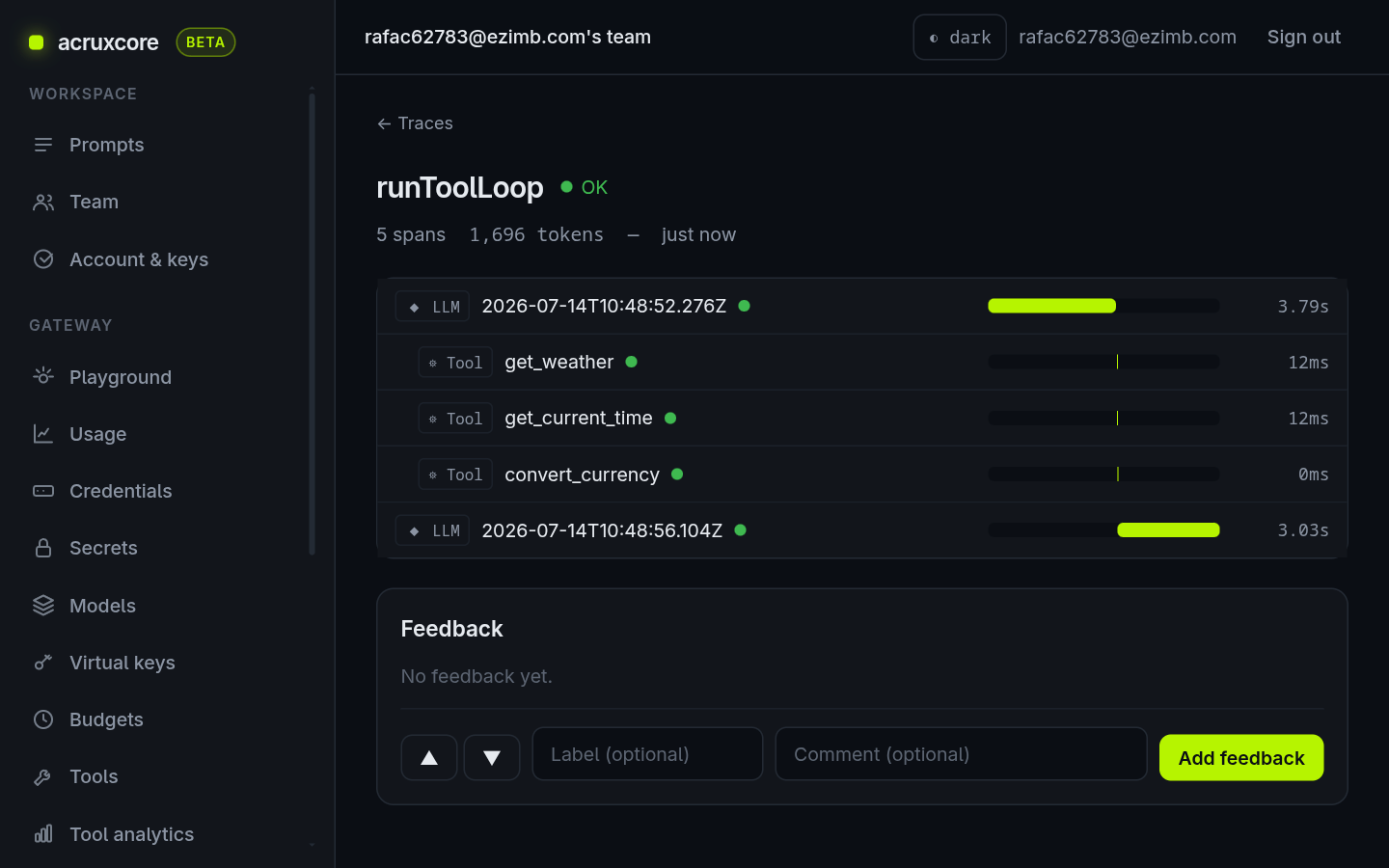
Click a tool span to see its captured input and output — here get_weather
received the city Tokyo and returned the conditions:
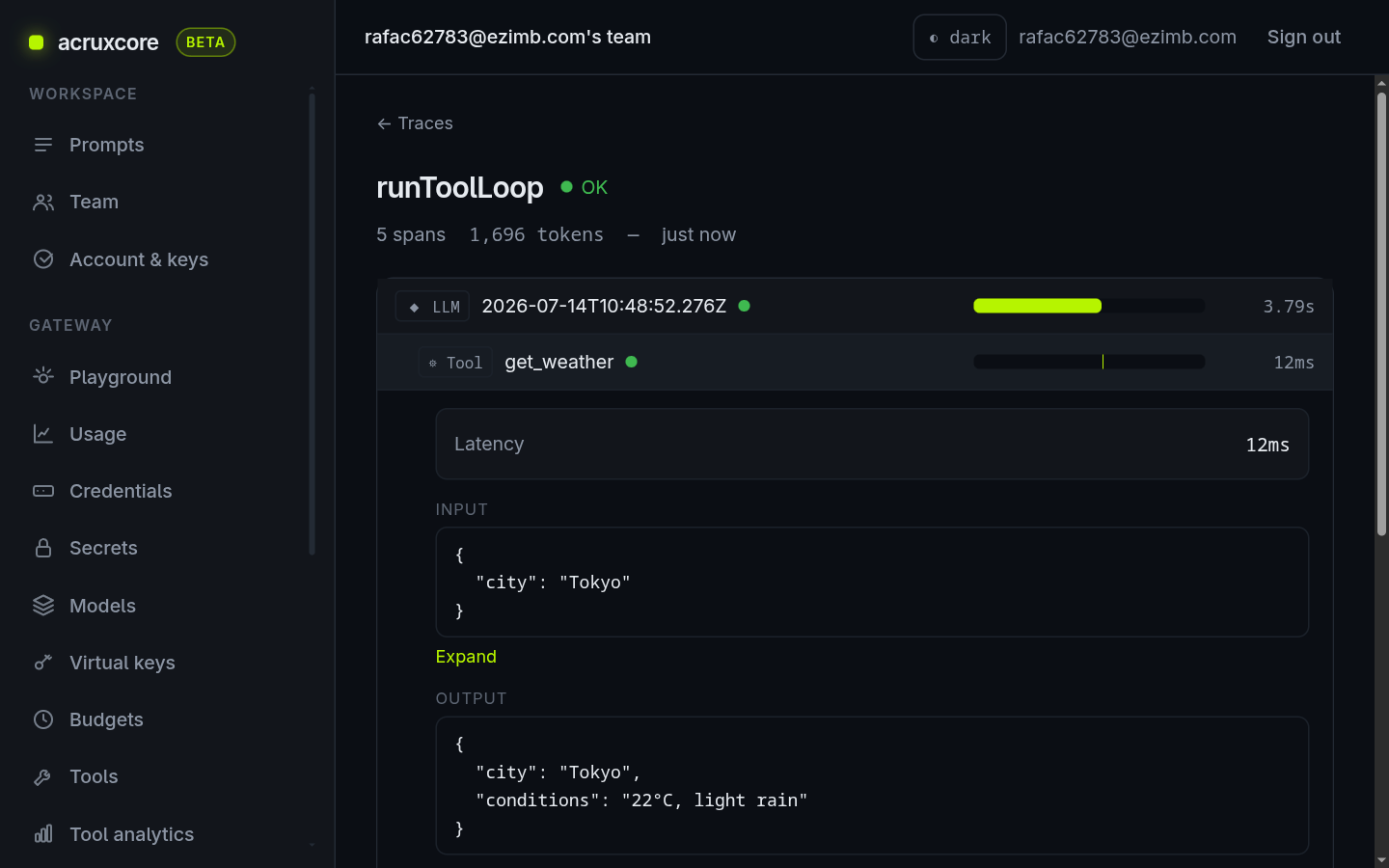
Input/output payloads appear only when payload capture is on for your team (Observability → Settings). It is on by default.
8. Stream the reply
Sometimes you want tokens as they are generated instead of waiting for the whole
answer. Call hub.gateway.stream() and it returns an async iterable — each
chunk carries a delta.content string you can print as it arrives.
This example reuses the same stored travel-assistant prompt: it renders it,
then streams the reply. It intentionally does not forward the bound tools —
streaming yields text deltas, and if the model chose to call a tool the first
turn would stream tool-call fragments instead of a readable answer (streaming does
not auto-run tools — that is what runToolLoop is for). Omitting tools keeps the
streamed output clean prose.
- Node (SDK)
- Python (SDK)
/**
 * Example: fetch a stored prompt with the SDK, then STREAM the reply token by
 * token instead of waiting for the whole completion.
 *
 * This reuses the same `travel-assistant` prompt that `rest-defined-agent.ts`
 * stores in the framework — run that example first (or store the prompt yourself)
 * so `hub.prompts.render` has something to fetch. The flow here is fetch → stream:
 *
 *   1. `hub.prompts.render(name, 'production', vars)` returns the templated `messages`
 *      (and the prompt's bound `tools`, which this example intentionally does
 *      NOT forward — see below).
 *   2. `hub.gateway.stream({ ... })` returns an async iterable. Each chunk carries
 *      a `delta.content` string; concatenating them rebuilds the full answer as it
 *      is generated, so a UI can render tokens live.
 *
 * Why no tools here: streaming yields text deltas. If the model decided to call a
 * tool instead of answering, the first turn would stream tool-call fragments, not
 * prose — and streaming does not auto-run tools (that is what `runToolLoop` is
 * for). To keep the streamed output a clean, readable answer, this example omits
 * `tools` so the model replies directly. Use `runToolLoop` when you need the tools.
 *
 * Run:
 *   ACRUXCORE_API_KEY=<your key> \
 *   ACRUXCORE_BASE_URL=https://api.acruxcore.com/api/v1 \
 *   ACRUXCORE_MODEL=<a model your team registered> \
 *   npx tsx packages/sdk/examples/stream-a-stored-prompt.ts
 *
 * `ACRUXCORE_MODEL` must be a model your team has registered in the gateway; it
 * defaults to `gpt-4o-mini`.
 */

import acruxcore from '@acruxcoreai/sdk';

const apiKey = process.env.ACRUXCORE_API_KEY;
const baseUrl = process.env.ACRUXCORE_BASE_URL;
const model = process.env.ACRUXCORE_MODEL ?? 'gpt-4o-mini';

if (!apiKey || !baseUrl) {
  throw new Error('Set ACRUXCORE_API_KEY and ACRUXCORE_BASE_URL first.');
}

const hub = new acruxcore({ apiKey, baseUrl });

async function main(): Promise<void> {
  // ── FETCH: the templated messages come from the stored prompt version.
  const { messages } = await hub.prompts.render('travel-assistant', 'production', {
    city: 'Tokyo',
    amount: 100,
    from: 'USD',
    to: 'JPY',
  });

  // ── STREAM: print each token as it arrives. `hub.gateway.stream()` returns
  // an async iterable of chunks (no `tools` forwarded — see file header).
  const stream = await hub.gateway.stream({ model, messages });

  let full = '';
  for await (const chunk of stream) {
    const piece = chunk.delta.content ?? '';
    process.stdout.write(piece); // render live
    full += piece;
  }

  console.log(`\n\n(streamed ${full.length} characters)`);
}

main().catch((err) => {
  console.error(err);
  process.exit(1);
});
"""Example: fetch a stored prompt with the SDK, then STREAM the reply token by
token instead of waiting for the whole completion.

This reuses the same `travel-assistant` prompt that `rest_defined_agent.py`
stores in the framework — run that example first (or store the prompt yourself)
so `hub.prompts.render` has something to fetch.

Run:
    ACRUXCORE_API_KEY=<your key> \\
    ACRUXCORE_BASE_URL=https://api.acruxcore.com/api/v1 \\
    ACRUXCORE_MODEL=<a model your team registered> \\
    python packages/sdk-python/examples/stream_a_stored_prompt.py
"""

from __future__ import annotations

import asyncio
import os

from acruxcore import AcruxCore

API_KEY = os.environ.get("ACRUXCORE_API_KEY", "")
BASE_URL = os.environ.get("ACRUXCORE_BASE_URL", "")
MODEL = os.environ.get("ACRUXCORE_MODEL", "gpt-4o-mini")

if not API_KEY or not BASE_URL:
    raise SystemExit("Set ACRUXCORE_API_KEY and ACRUXCORE_BASE_URL first.")


async def main() -> None:
    async with AcruxCore() as hub:
        # ── FETCH: the templated messages come from the stored prompt version.
        rendered = await hub.prompts.render("travel-assistant", "production", {
            "city": "Tokyo",
            "amount": 100,
            "from": "USD",
            "to": "JPY",
        })
        messages = rendered.messages

        # ── STREAM: print each token as it arrives.
        stream = await hub.gateway.stream(MODEL, messages)

        full = ""
        async for chunk in stream:
            piece = chunk.delta.get("content", "")
            print(piece, end="", flush=True)
            full += piece

        print(f"\n\n(streamed {len(full)} characters)")


if __name__ == "__main__":
    asyncio.run(main())
Run it the same way:
export ACRUXCORE_MODEL=<your registered model>
npx tsx packages/sdk/examples/stream-a-stored-prompt.ts
The answer prints token by token as it is generated:
I appreciate your question, but I don't have access to real-time tools for
checking weather, current time, or currency exchange rates. Here's what I can
suggest:

- Weather in Tokyo: Check a weather site like weather.com ...
- Current time in Tokyo: Tokyo is in the JST (UTC+9) timezone ...
- USD to JPY conversion: Check a currency converter like xe.com ...

(streamed 699 characters)
Without the tools, the model answers from its own knowledge — which is exactly
why the tool-driven runToolLoop in step 6 returns concrete, live values instead.
What's next
- Use the SDK for chat and feedback — more ways to call the gateway and attach feedback to traces.
- Version a prompt — commit new versions and move the
productionalias. - API details: see Prompts, Prompt Versions, Tools, and Tool Versions in the API Reference.