Build a tool-calling agent in Python (no SDK)
What you'll build: a weather assistant you run from a single Python file
using only requests — no SDK. Python calls
the gateway for the model, runs the tool itself when the model asks for one,
feeds the result back, and the whole run lands in one trace you can open in
the dashboard. You'll do it twice: once waiting for the full answer, and once
streaming the reply token by token.
There are two ways a tool can run in Acrux Core. An HTTP tool runs on the gateway — you describe a request once and the platform makes it (see Build a tool-calling agent in the dashboard). A client tool runs in your process: the platform only stores the tool's JSON schema, and when the model calls it, your code executes the work. This guide uses a client tool, so the tool logic lives in your Python — which is the realistic shape when the tool touches your database, an internal service, or anything the gateway can't reach.
The setup is a one-time thing you do in the dashboard: a credential (your provider key), a model (a callable name pointing at that key), a prompt with the tool attached, and a personal API key so Python can authenticate. Then the whole run is Python.
An OpenRouter API key (any provider works — OpenAI,
Anthropic, Gemini; OpenRouter just gives one key for many models) and Python 3.9+
with requests installed (pip install requests).
1. Store your provider key as a credential
A credential is a provider API key, encrypted at rest. Open Gateway → Credentials and click New credential. OpenRouter speaks the OpenAI protocol, so pick OpenAI-compatible as the provider — that reveals a Base URL field. Fill it in as below and paste your OpenRouter key (the key box is masked and is never shown again after you save).
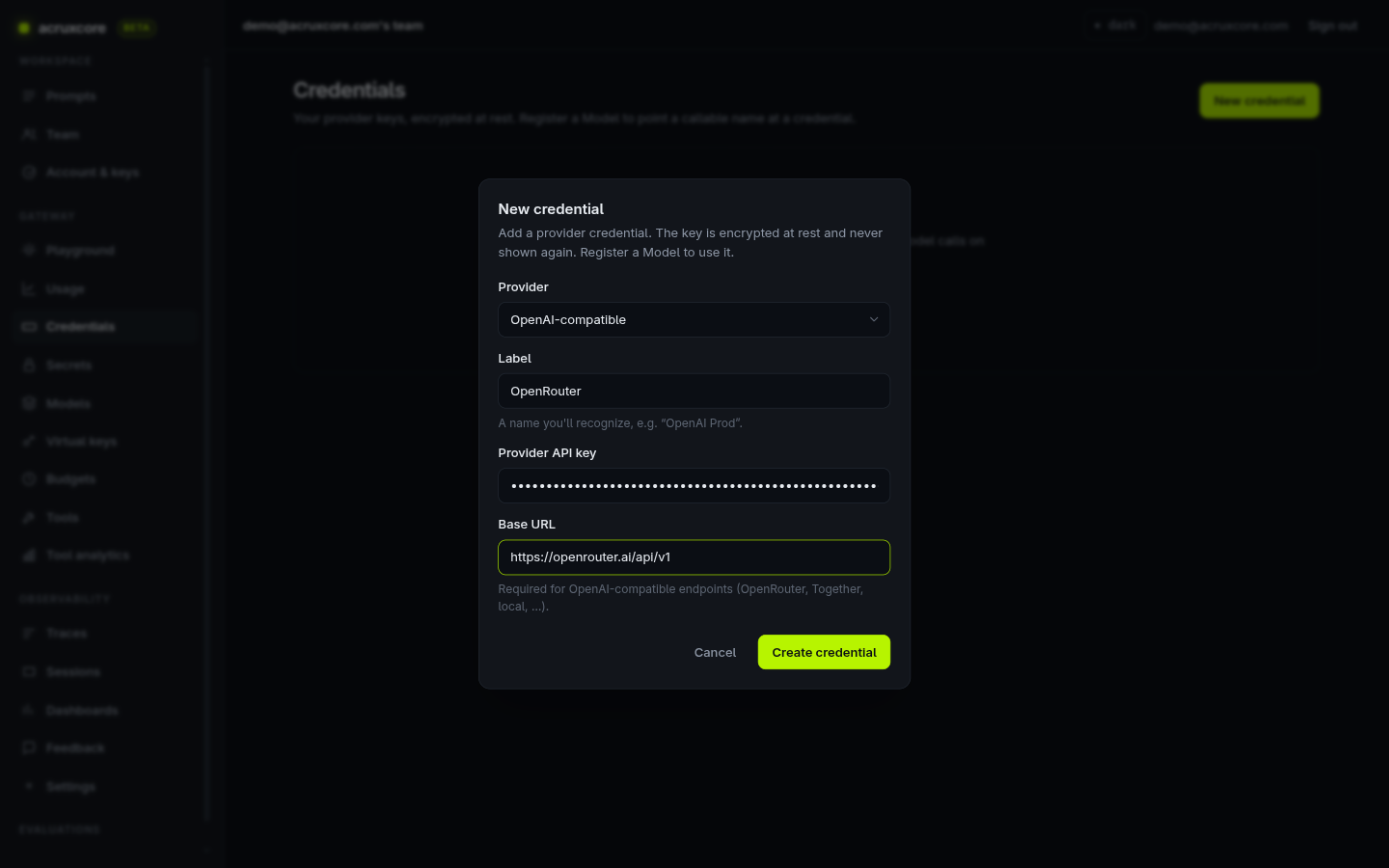
Click Create credential. The gateway can now call OpenRouter on your behalf, but nothing is callable yet — a credential needs a model pointed at it.
2. Register a model
A model is a public name your code sends as "model", mapped to an upstream
model on one of your credentials. Open Gateway → Models → New model. Name it
gpt-4o-mini, keep the OpenRouter credential selected, and set the upstream
model to openai/gpt-4o-mini — that's OpenRouter's id for it. Leave prices blank
(they auto-fill for known models).
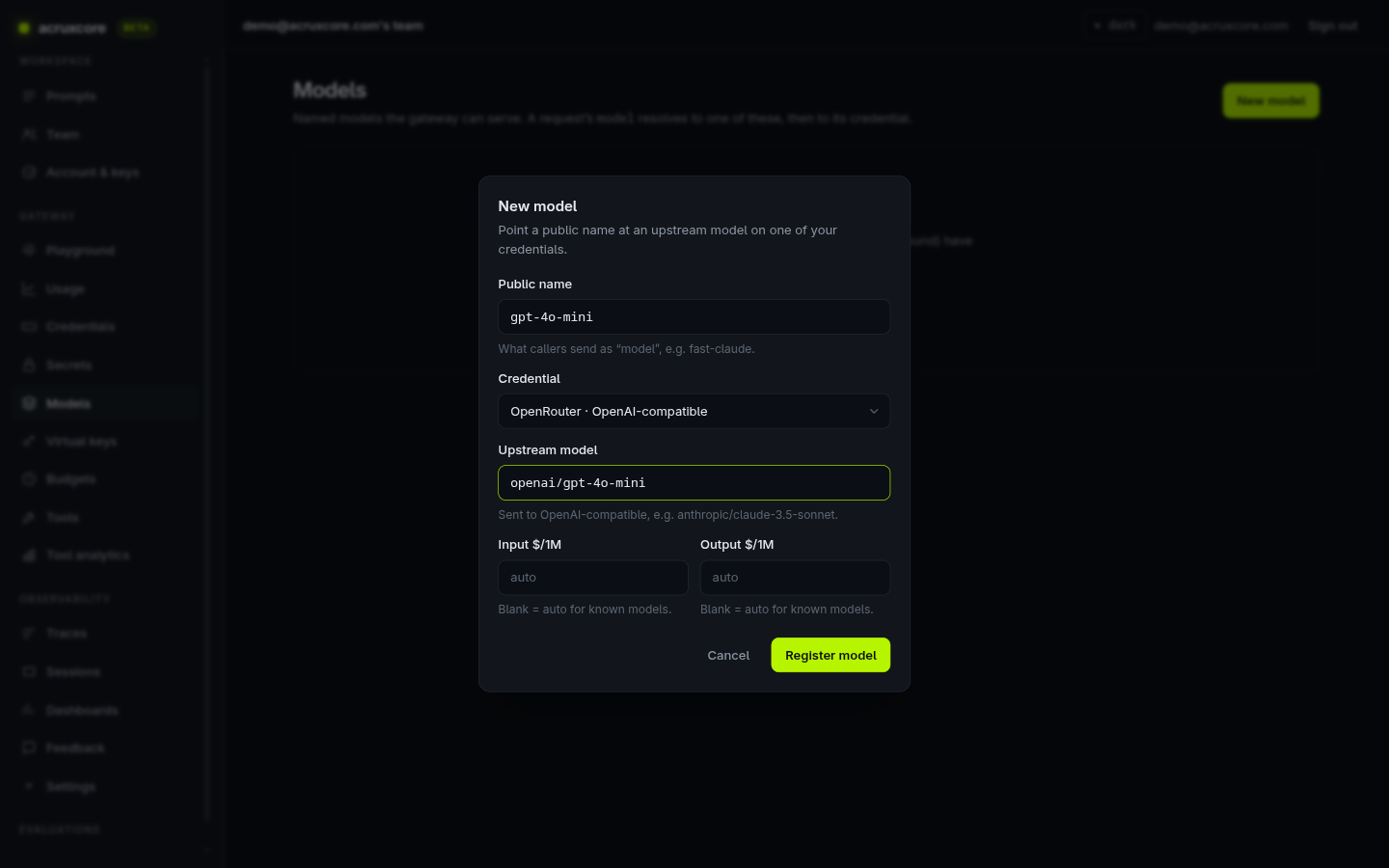
Click Register model. Hit Test on the new row to fire a 1-token completion and confirm the key really works before you go further.
3. Create a personal API key
Your Python needs a key to authenticate. Open Account & keys → New key, name
it python-agent, and create it.
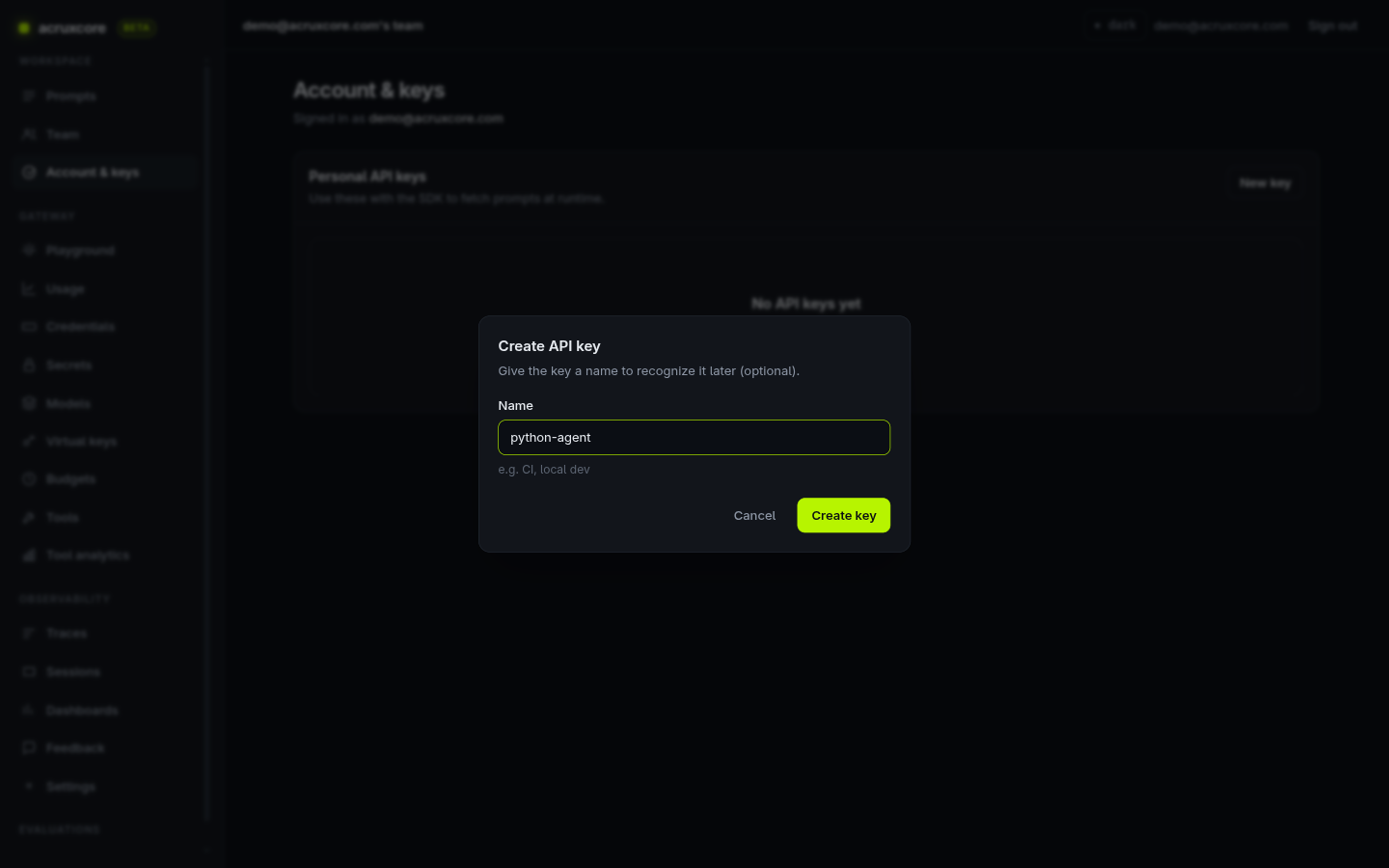
Copy the key the moment it's shown — this is the only time the full value appears. Then set it and the API base URL as environment variables so every script below can read them:
export ACRUXCORE_API_KEY=<your personal api key>
export ACRUXCORE_BASE_URL=https://api.acruxcore.com/api/v1
4. Create the prompt and tool over REST
Both a prompt and a tool are created in two steps: a shell (name +
description) and then an immutable version. For the tool, the version carries
the JSON schema the model reads and an executor of { "type": "client" } —
"my own app runs this." For the prompt, the version carries the templated
messages, a default model, and tools: [{ toolId }] that attach the tool so
one render call returns both together.
- curl
# 4a. Tool shell
curl -X POST "$ACRUXCORE_BASE_URL/tools" \
  -H "Authorization: Bearer $ACRUXCORE_API_KEY" -H "Content-Type: application/json" \
  -d '{"name":"get_weather","description":"Get the current weather for a city."}'

# 4b. Tool version — client executor + the parameters schema (use the id from 4a)
curl -X POST "$ACRUXCORE_BASE_URL/tools/<tool-id>/versions" \
  -H "Authorization: Bearer $ACRUXCORE_API_KEY" -H "Content-Type: application/json" \
  -d '{
    "description": "Get the current weather for a city.",
    "parametersSchema": {"type":"object","properties":{"city":{"type":"string","description":"City name, e.g. \"Tokyo\"."}},"required":["city"]},
    "executor": {"type":"client"}
  }'

# 4c. Prompt shell
curl -X POST "$ACRUXCORE_BASE_URL/prompts" \
  -H "Authorization: Bearer $ACRUXCORE_API_KEY" -H "Content-Type: application/json" \
  -d '{"name":"py-weather-agent","description":"Weather assistant driven by a plain-Python REST tool loop."}'

# 4d. Prompt version — messages, default model, and the tool attached (use the ids above)
curl -X POST "$ACRUXCORE_BASE_URL/prompts/<prompt-id>/versions" \
  -H "Authorization: Bearer $ACRUXCORE_API_KEY" -H "Content-Type: application/json" \
  -d '{
    "messages": [
      {"role":"system","content":"You are a weather assistant. Use the get_weather tool to look up conditions before answering. Never guess."},
      {"role":"user","content":"What is the weather in {{ city }} right now?"}
    ],
    "model": "gpt-4o-mini",
    "tools": [{"toolId":"<tool-id>"}]
  }'
The first version of each auto-creates production and staging aliases. Open
the prompt in the dashboard to confirm: the Editor tab shows the two messages,
the bound default model, and PRODUCTION → v1.
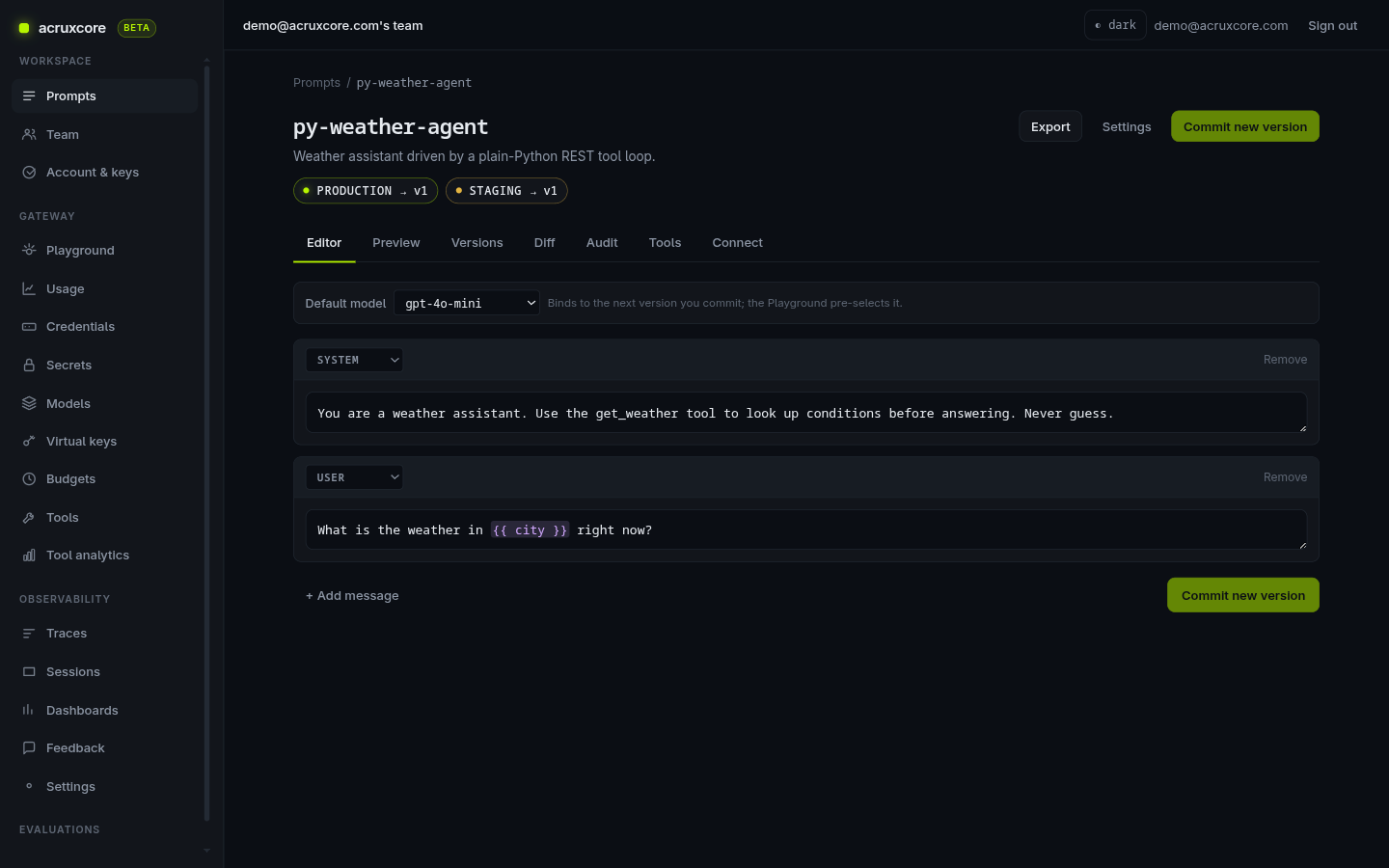
The Tools tab confirms get_weather is attached to v1:
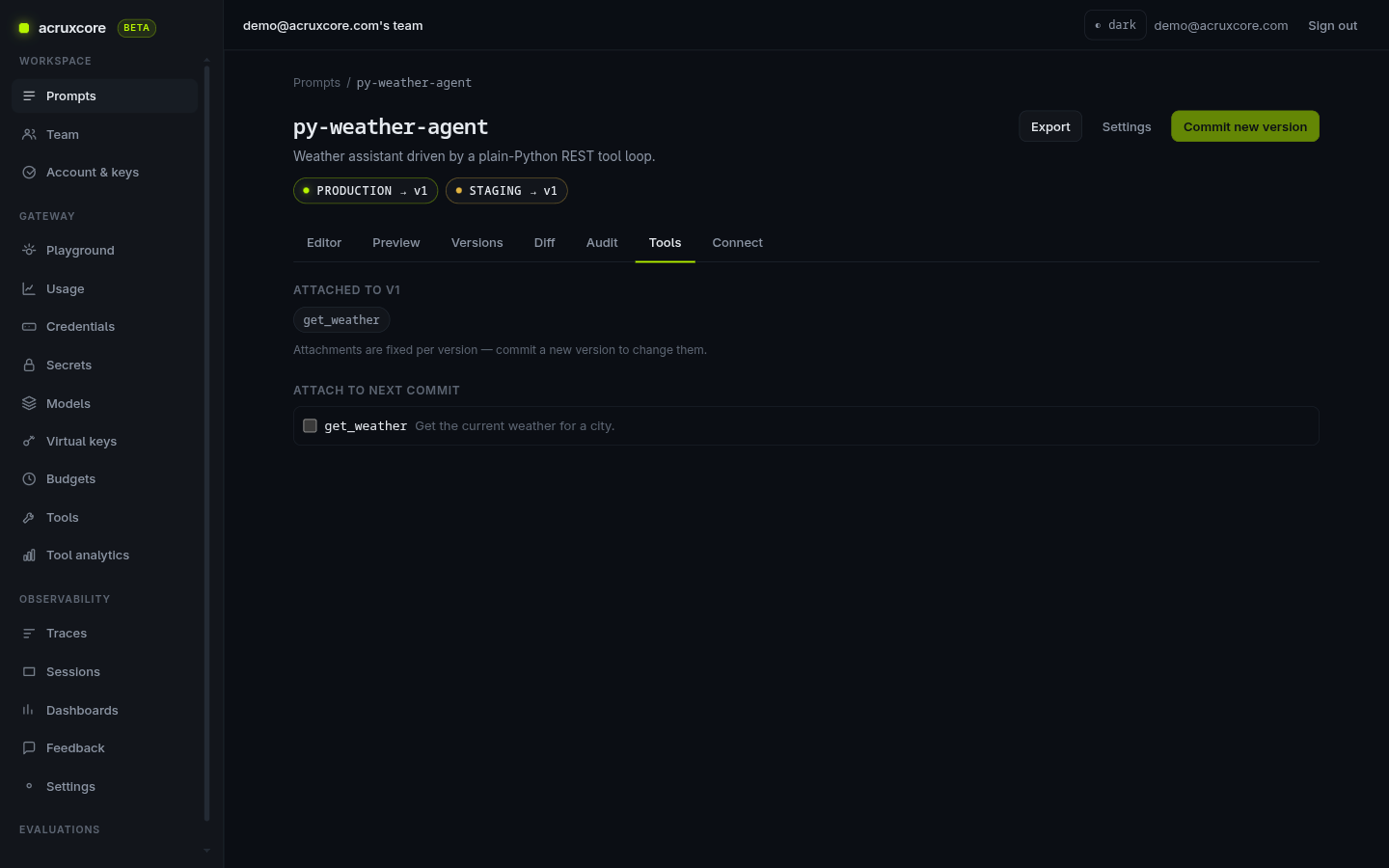
You can also create the prompt and tool by clicking — see Build a tool-calling agent in the dashboard. The UI and the REST API write to the same catalog.
5. Run the agent in Python
Now the run path — plain requests, no SDK. Two REST endpoints do the work:
POST /prompts/{name}/{alias}/renderreturns the renderedmessagesand the attachedtools, already in OpenAI shape. Neither is hard-coded in your file.POST /gateway/chat/completionsis the OpenAI-compatible completion. Send the messages and tools; the gateway calls OpenRouter and records the LLM span itself.
The trick to getting one trace for the whole loop is a header. On the first
call send x-trace-name to open a trace; the response comes back with an
x-gateway-trace-id header. On every later call send that id back as x-trace-id,
so each model turn attaches to the same trace. When the model asks for a tool, you
run it locally, add a tool span to that trace with POST /traces, append the
result, and loop.
Here is the complete, runnable file:
Full source: weather_agent.py
"""
Tool-calling agent in plain Python — no SDK, just `requests` against the Acrux
Core REST API. The tool runs on the CLIENT (in this process), not on the gateway.

Flow:
  1. render  — POST /prompts/:name/:alias/render -> {messages, tools}
  2. loop    — POST /gateway/chat/completions with the messages + tools.
               * first turn sends `x-trace-name` to open a trace; the gateway
                 replies with `x-gateway-trace-id`.
               * later turns send `x-trace-id` so every model turn lands in the
                 SAME trace.
               When the model asks for a tool, we run it here, POST a `tool`
               span to /traces (same trace id), append the result, and loop.
  3. done    — the model stops asking for tools; print its final answer.

Run:
  export ACRUXCORE_API_KEY=<your personal api key>
  export ACRUXCORE_BASE_URL=https://api.acruxcore.com/api/v1
  python weather_agent.py
"""

import json
import os
from datetime import datetime, timezone

import requests

API_KEY = os.environ["ACRUXCORE_API_KEY"]
BASE_URL = os.environ["ACRUXCORE_BASE_URL"].rstrip("/")
HEADERS = {"Authorization": f"Bearer {API_KEY}", "Content-Type": "application/json"}


def now() -> str:
    """Current time as an ISO-8601 string with a timezone offset (what /traces wants)."""
    return datetime.now(timezone.utc).isoformat()


# ── The tool, implemented on the client ──────────────────────────────────────
# Canned data keeps the example self-contained; a real tool would call a weather
# API, read a database, hit an internal service — anything your process can do.
WEATHER = {
    "tokyo": "22°C, light rain",
    "london": "15°C, overcast",
    "paris": "19°C, clear",
}


def get_weather(city: str) -> dict:
    """The local implementation the model's `get_weather` tool call routes to."""
    return {"city": city, "conditions": WEATHER.get(city.lower(), "no data for that city")}


def run_tool(name: str, args: dict):
    """Route one tool call from the model to its local implementation."""
    if name == "get_weather":
        return get_weather(**args)
    raise ValueError(f"Unknown tool: {name}")


# ── REST helpers ─────────────────────────────────────────────────────────────
def render_prompt(name: str, alias: str, variables: dict) -> dict:
    """Fetch the stored prompt: rendered messages + attached tool schemas."""
    r = requests.post(
        f"{BASE_URL}/prompts/{name}/{alias}/render",
        headers=HEADERS,
        json={"variables": variables},
    )
    r.raise_for_status()
    return r.json()


def complete(model, messages, tools, trace_id):
    """One gateway completion. Threads the trace; returns (message, trace_id)."""
    headers = dict(HEADERS)
    if trace_id:
        headers["x-trace-id"] = trace_id           # attach to the existing trace
    else:
        headers["x-trace-name"] = "py-weather-agent"  # open a new trace
    r = requests.post(
        f"{BASE_URL}/gateway/chat/completions",
        headers=headers,
        json={"model": model, "messages": messages, "tools": tools},
    )
    r.raise_for_status()
    # The gateway records the LLM span itself; we only need the trace id it used.
    trace_id = r.headers["x-gateway-trace-id"]
    return r.json()["choices"][0]["message"], trace_id


def log_tool_span(trace_id, name, args, result, started, ended):
    """Add a `tool` span for a client-side call to the SAME trace as the LLM spans."""
    requests.post(
        f"{BASE_URL}/traces",
        headers=HEADERS,
        json={
            "traces": [
                {
                    "traceId": trace_id,
                    "capturePayloads": True,
                    "spans": [
                        {
                            "spanId": f"{name}-{started}",
                            "name": name,
                            "kind": "tool",
                            "status": "ok",
                            "startTime": started,
                            "endTime": ended,
                            "input": args,
                            "output": result,
                        }
                    ],
                }
            ]
        },
    ).raise_for_status()


# ── The agent loop ───────────────────────────────────────────────────────────
def main():
    model = "gpt-4o-mini"
    rendered = render_prompt("py-weather-agent", "production", {"city": "Tokyo"})
    messages, tools = rendered["messages"], rendered["tools"]
    print(f"Fetched {len(messages)} message(s) + {len(tools)} tool(s) "
          f"[{', '.join(t['function']['name'] for t in tools)}]\n")

    trace_id = None
    for turn in range(1, 6):  # a small cap so a misbehaving model can't loop forever
        message, trace_id = complete(model, messages, tools, trace_id)
        messages.append(message)

        tool_calls = message.get("tool_calls")
        if not tool_calls:
            print("Assistant:", message["content"])
            print(f"\n({turn} model turn(s), trace {trace_id})")
            return

        for call in tool_calls:
            name = call["function"]["name"]
            args = json.loads(call["function"]["arguments"])
            started = now()
            result = run_tool(name, args)
            ended = now()
            print(f"  → {name}({args}) = {result}")
            log_tool_span(trace_id, name, args, result, started, ended)
            # Feed the tool result back so the model can use it next turn.
            messages.append({
                "role": "tool",
                "tool_call_id": call["id"],
                "content": json.dumps(result),
            })

    print("Stopped: hit the turn limit without a final answer.")


if __name__ == "__main__":
    main()
Run it:
python weather_agent.py
The model asks for get_weather, your code runs it and prints the call, the model
gets the result back, and the second turn is the final answer:
Fetched 2 message(s) + 1 tool(s) [get_weather]

  → get_weather({'city': 'Tokyo'}) = {'city': 'Tokyo', 'conditions': '22°C, light rain'}
Assistant: The current weather in Tokyo is 22°C with light rain.

(2 model turn(s), trace 02bd6182-5dc0-4be2-a1ec-15361b85c5d6)
6. Stream the reply
Sometimes you want tokens as they're generated instead of waiting for the whole
answer. Set "stream": true in the body and read the gateway's
Server-Sent Events
stream: one data: frame per chunk, each carrying a delta.content string,
ending with data: [DONE].
Streaming yields text deltas, so this example does not forward the tools: if
the model decided to call one, the first turn would stream tool-call fragments
instead of readable prose, and streaming does not auto-run tools (that's what the
loop in step 5 is for). Omitting tools keeps the streamed output clean.
Full source: weather_stream.py
"""
Stream a stored prompt's reply token by token — plain Python, no SDK.

Same first step as `weather_agent.py` (render the stored prompt), but instead of
waiting for the whole completion we set `"stream": true` and read the gateway's
Server-Sent Events (SSE) stream: one `data:` frame per chunk, each carrying a
`choices[0].delta.content` string, terminated by `data: [DONE]`.

Streaming yields text deltas, so this example does NOT forward the prompt's tools:
if the model chose to call a tool, the first turn would stream tool-call fragments
instead of readable prose (streaming does not auto-run tools — the loop in
`weather_agent.py` is for that). Omitting `tools` keeps the streamed output clean.

Run:
  export ACRUXCORE_API_KEY=<your personal api key>
  export ACRUXCORE_BASE_URL=https://api.acruxcore.com/api/v1
  python weather_stream.py
"""

import json
import os

import requests

API_KEY = os.environ["ACRUXCORE_API_KEY"]
BASE_URL = os.environ["ACRUXCORE_BASE_URL"].rstrip("/")
HEADERS = {"Authorization": f"Bearer {API_KEY}", "Content-Type": "application/json"}


def render_prompt(name, alias, variables):
    r = requests.post(
        f"{BASE_URL}/prompts/{name}/{alias}/render",
        headers=HEADERS,
        json={"variables": variables},
    )
    r.raise_for_status()
    return r.json()


def main():
    rendered = render_prompt("py-weather-agent", "production", {"city": "Paris"})

    # `stream=True` on the request keeps the socket open so we can read frames as
    # they arrive; `"stream": true` in the body asks the gateway for SSE.
    resp = requests.post(
        f"{BASE_URL}/gateway/chat/completions",
        headers=HEADERS,
        json={"model": "gpt-4o-mini", "messages": rendered["messages"], "stream": True},
        stream=True,
    )
    resp.raise_for_status()

    full = ""
    for line in resp.iter_lines(decode_unicode=True):
        if not line or not line.startswith("data: "):
            continue
        data = line[len("data: "):]
        if data == "[DONE]":
            break
        piece = json.loads(data)["choices"][0]["delta"].get("content", "")
        print(piece, end="", flush=True)  # render live
        full += piece

    print(f"\n\n(streamed {len(full)} characters)")


if __name__ == "__main__":
    main()
Run it and the answer prints as it's generated:
python weather_stream.py
I need to check the current weather conditions in Paris. Please hold on for a moment.

(streamed 85 characters)
Without the tool, the model can only say it would check — which is exactly why the tool-driven loop in step 5 returns concrete conditions. Reach for streaming when you want a readable answer to appear live; reach for the loop in step 5 when the model needs to call tools.
7. Inspect the trace
Every run above landed in one trace, because each completion threaded the same
x-trace-id. Open Observability → Traces and click the newest
py-weather-agent run: the LLM turn that asked for the tool, the get_weather
tool span your Python added, and the final LLM turn — three spans, all in order.
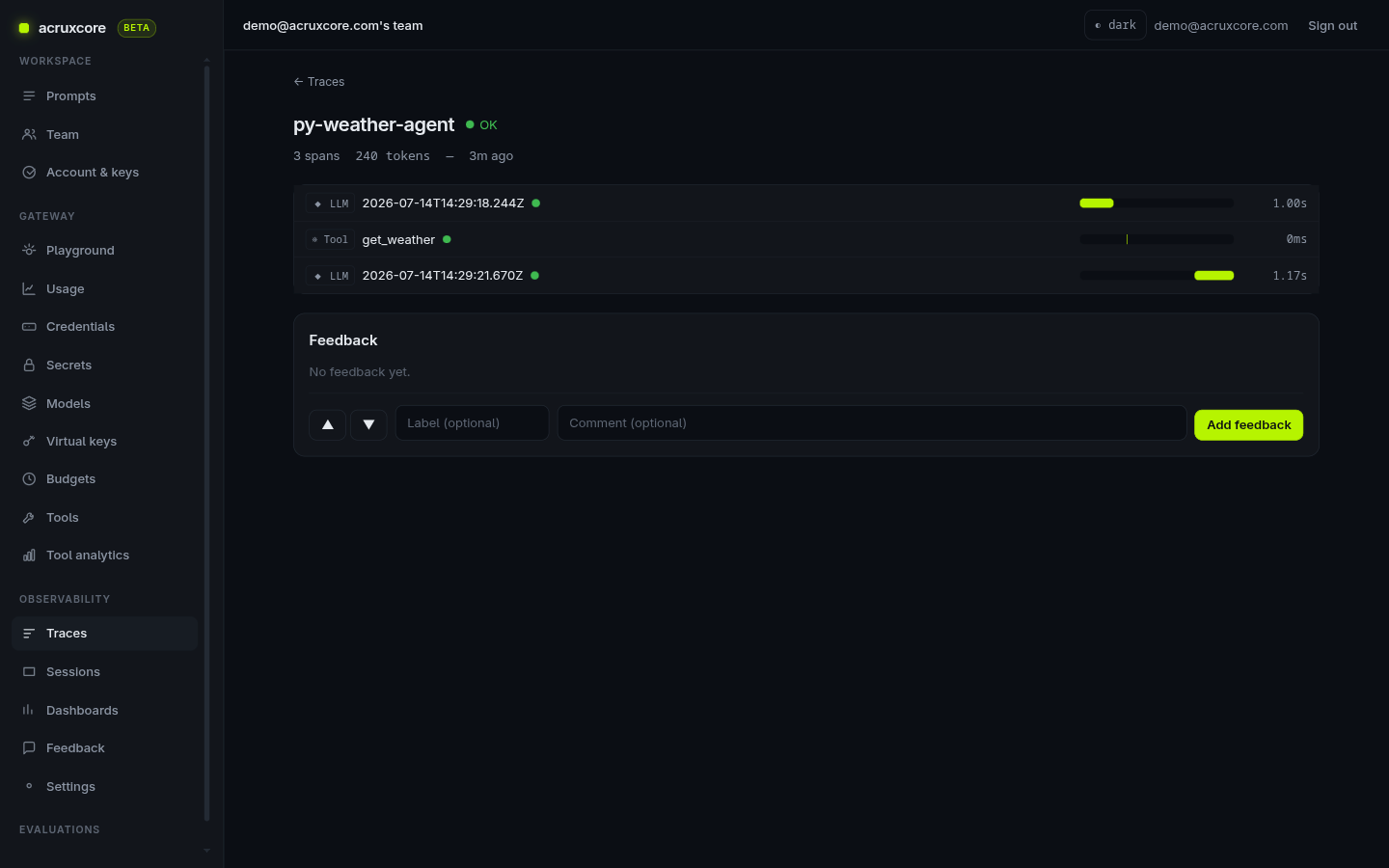
Click the get_weather span to see the payloads your loop captured — the city
argument the model chose as input, and the conditions your code returned as
output:
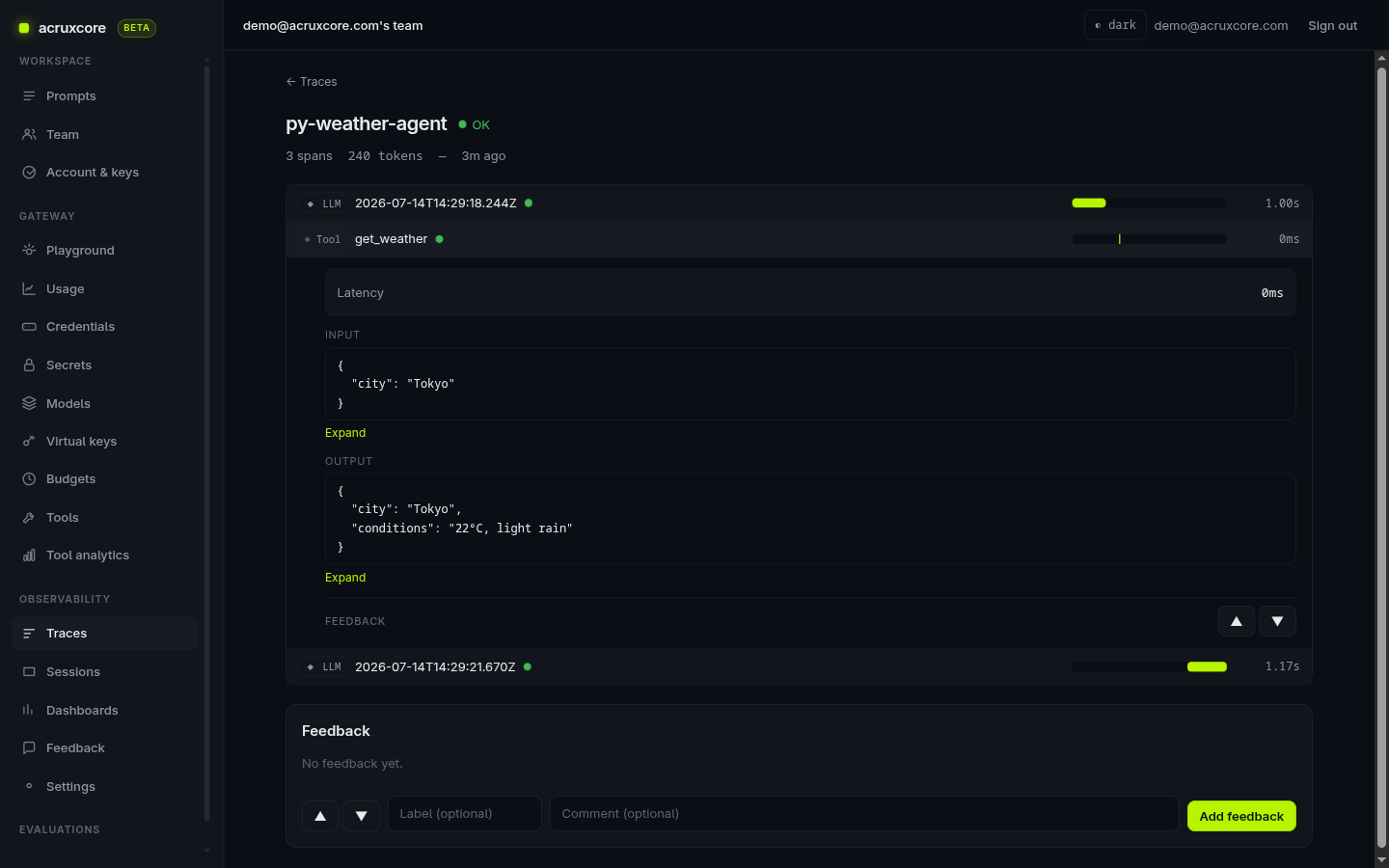
The LLM spans were recorded by the gateway; the tool span is the one you posted from Python — together they tell the whole story of the run.
Inputs and outputs are stored only when payload capture is on for your team
(it's on by default). The weather_agent.py loop also passes
"capturePayloads": true when it posts the tool span. Turn capture off in
Observability → Settings if you'd rather not store request bodies.
Scripting the setup over the API
Steps 1–3 are dashboard actions, but the credential and model have REST equivalents too — handy for provisioning a new environment from a script. (The first personal API key is bootstrapped in the dashboard, since a REST call needs a key to authenticate in the first place.) Both responses below are real:
- curl
# Credential (OpenRouter is OpenAI-compatible, so config.base_url is required)
curl -X POST "$ACRUXCORE_BASE_URL/gateway/connections" \
  -H "Authorization: Bearer $ACRUXCORE_API_KEY" -H "Content-Type: application/json" \
  -d '{"provider":"openai_compatible","label":"OpenRouter","apiKey":"<your openrouter key>","config":{"base_url":"https://openrouter.ai/api/v1"}}'
{
  "id": "a2d765cc-8a97-4596-8d2e-bf4bd0418441",
  "provider": "openai_compatible",
  "label": "OpenRouter",
  "keyLastFour": "c2b9",
  "config": { "base_url": "https://openrouter.ai/api/v1" },
  "createdAt": "2026-07-14T14:33:50.374Z"
}
# Model — point a callable name at an upstream model on that credential
curl -X POST "$ACRUXCORE_BASE_URL/gateway/models" \
  -H "Authorization: Bearer $ACRUXCORE_API_KEY" -H "Content-Type: application/json" \
  -d '{"publicName":"gpt-4o-mini","upstreamModel":"openai/gpt-4o-mini","credentialId":"<credential-id>"}'
{
  "id": "89141307-9c4b-460e-b813-f40886ba6e5e",
  "publicName": "gpt-4o-mini",
  "upstreamModel": "openai/gpt-4o-mini",
  "credentialId": "a2d765cc-8a97-4596-8d2e-bf4bd0418441",
  "credentialLabel": "OpenRouter",
  "provider": "openai_compatible",
  "inputPricePerM": null,
  "outputPricePerM": null,
  "fallbacks": []
}
What's next
- Store prompts and tools via the API — the
same store → fetch → run flow using the TypeScript SDK, which wraps the loop in
one
runToolLoopcall. - Build a tool-calling agent in the dashboard — the no-code path, with HTTP tools the gateway runs for you.
- Using sessions and traces — group related runs and dig into what happened.
- API details: see Gateway, Prompts, Tools, and Traces in the API Reference.